Before You Switch On a Meta Ad: Seven Checks for the Paused Window
A Facebook or Instagram campaign is cheapest to fix before it spends anything. Once it is live, mistakes cost money, and significant edits send it back into learning.
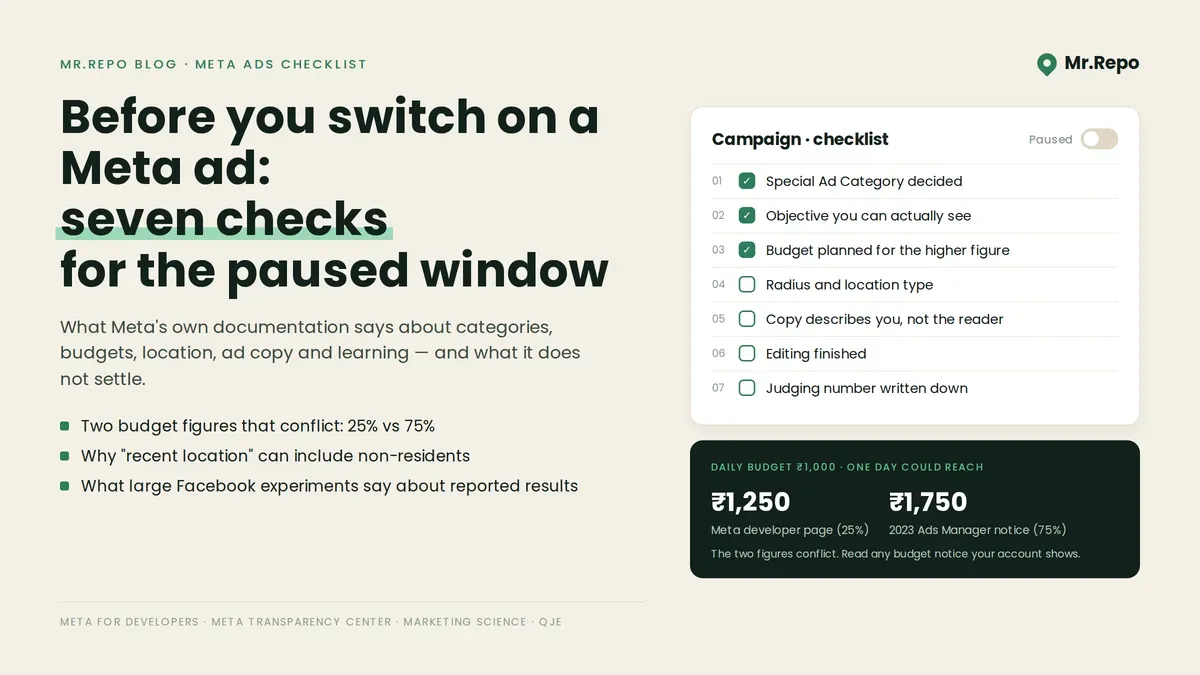
This post is a pre-flight checklist: seven things to confirm while a campaign is still paused, each with what Meta's documentation says and what to check. Where figures conflict, or where a figure we looked for is not on the Meta page we read, we note it.
A note on sources. We could not access Meta's Business Help Center, so every Meta quotation below comes from Meta's developer documentation or Transparency Center, except one Ads Manager notice a practitioner reproduced. The developer pages are written for API users, and Ads Manager's wording may differ.
Check 1: Does your ad fall into a Special Ad Category?
Meta's documentation says Marketing API users "must identify whether or not new and edited campaigns belong to a Special Ad Category." The categories in its reference include housing, employment, credit, and social issues, elections or politics. The same page describes a separate financial-services category for US advertisers.
For housing, employment and credit ads, Meta's page says options "are generally fixed to include ages 18 through 65+". The page also says "Specific gender cannot be targeted," "ZIP code selection is unavailable," and those advertisers "do not have access to Lookalike Audiences." The same page says location selections "must include a minimum radius from any selected city, address or custom location." It gives no number for that radius.
What to check while paused: if your ad touches housing, jobs, credit, finance or politics, decide whether a category applies before you build an audience around a ZIP code or a gender. If unsure, check Meta's current guidance, not your industry name.
Check 2: Is the objective something you can actually see?
Meta's API reference lists campaign objectives including Awareness, Traffic, Engagement, Leads, App promotion and Sales.
The practical question for a local business is whether you can observe the result you are asking for. If the goal is a booking on your website, the website needs a way to report that booking back. Meta describes its Pixel as "a snippet of JavaScript code that allows you to track visitor activity on your website," and says tracked conversions appear in Ads Manager "where they can be used to measure the effectiveness of your ads".
What to check while paused: if you choose Sales or Leads, confirm the event you care about (a booking, a form, a call request) is being recorded before spend starts, and confirm in your own account which events each objective can use.
Check 3: What will your daily budget actually spend?
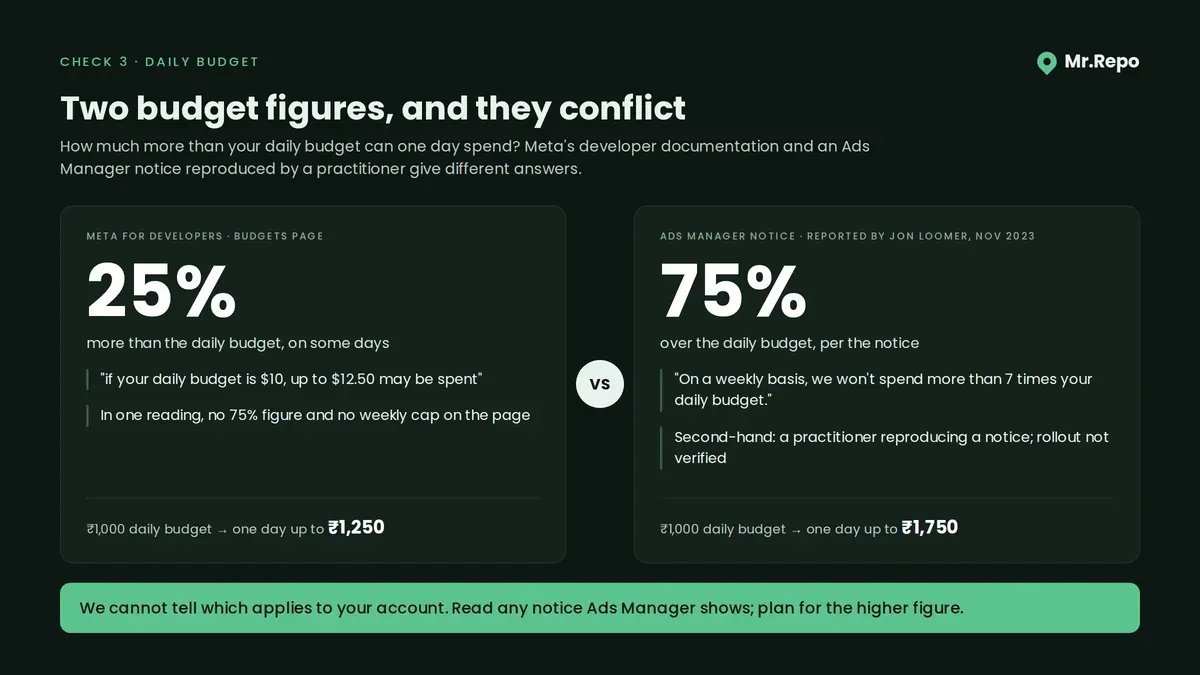
Meta's developer page on budgets defines a daily budget as "The average amount you're willing to spend on an ad set or campaign each day." It says that on some days "up to 25% more than your daily budget may be spent," with the example "if your daily budget is $10, up to $12.50 may be spent." For lifetime budgets: "You won't be charged more than your lifetime budget for your ad set's results unless you change your delivery settings."
In November 2023 the practitioner Jon Loomer reproduced a notice he saw in Ads Manager when setting an ad set budget. It allowed spend of up to 75% over the daily budget, with the line: "On a weekly basis, we won't spend more than 7 times your daily budget." He wrote that Meta "normally says" it will spend up to 25% more on some days. In one reading, the developer page showed no 75% figure and no weekly cap.
We cannot tell you which figure applies to your account today.
What to check while paused: read the budget notice Ads Manager shows when you set the budget, and plan for the higher figure on any single day. On a ₹1,000 daily budget, one day could reach ₹1,250 or ₹1,750. If a day at the higher figure would hurt, lower the budget.
Check 4: Who counts as "near your business"?
Meta's developer documentation says a custom location can carry a radius "from .63 to 50 miles, or 1 to 80 kilometers." It also describes a location type for people "whose recent location is in a selected area, as determined from mobile device data."
If that type is used, someone whose phone was recently in your area can be included in a "local" audience.
If you turn on Advantage+ audience, Meta's developer page says it expands "the eligible audience pool the delivery system can search, subject to your non-negotiable constraints," and lists location among the constraints it does not expand.
What to check while paused: set the radius to the distance your customers actually travel, then look at which location type the campaign uses. Read the labels in your own Ads Manager; we did not capture their wording.
Check 5: Does the ad copy tell people what they are?
Meta has a specific policy here. Its Transparency Center states: "Ads must not contain content that asserts or implies personal attributes." It explains that "Ads that make assumptions about people could be perceived as intrusive, unsettling or inaccurate." The page gives "Meet Hispanic men online now!" as an example of an ad that is not allowed, and "We print customizable t-shirts and stickers with your name" as one that is.
One place to look is the opening line. Copy that addresses the reader as someone with a condition or a problem (Struggling with back pain?) can read as asserting an attribute. Copy that describes what you do (We treat back pain, Monday to Saturday) describes the business instead. Both examples are ours, not Meta's; Meta's policy page decides where the line sits.
What to check while paused: read each headline and ask whether it says something about the reader or about you. Reconsider the first kind.
Check 6: Are you finished editing?
Meta's developer reference lists these learning states for an ad set: "The ad set is still learning," "The ad set exited the learning phase," and "The ad set isn't generating enough results to exit the learning phase." It also says "Significant edits cause ad sets to reenter the learning phase."
The reference page gives no event count or time window, so we are not supplying numbers.
What to check while paused: budget, audience, objective and creative, all settled. If you are unsure between two headlines, Meta offers a split test, which its documentation describes as a way to "Test different advertising strategies on mutually exclusive audiences to see what works."
Check 7: How will you know whether the ad did anything?
Ads Manager's numbers tell you what happened among people who saw an ad. They do not, on their own, tell you what would have happened if those people had not seen it.
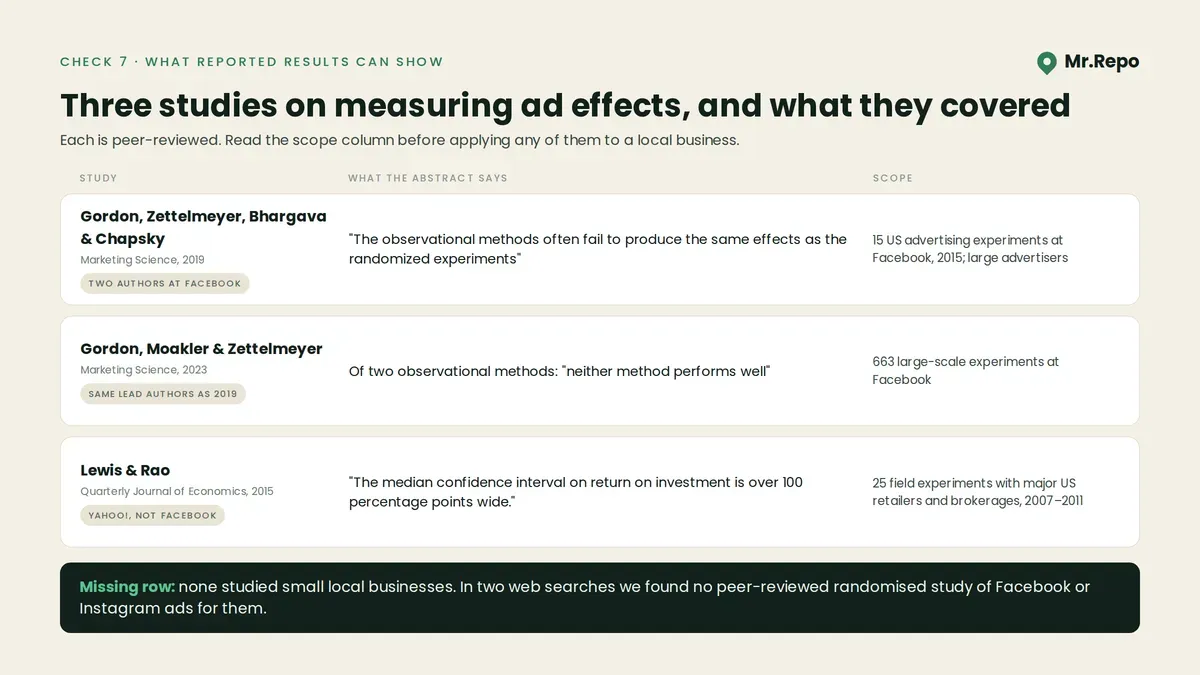
Gordon, Zettelmeyer, Bhargava and Chapsky (2019) compared randomised experiments with observational methods, using data from "15 U.S. advertising experiments at Facebook" run in 2015. Their conclusion: "The observational methods often fail to produce the same effects as the randomized experiments". They also note that "few online ad campaigns rely on RCTs". Two of the four authors worked at Facebook.
A follow-up by two of the same authors with a Meta researcher, Gordon, Moakler and Zettelmeyer (2023), analysed "663 large-scale experiments at Facebook". Testing two observational methods, they found that "neither method performs well", even with data "richer than what most advertisers or their measurement partners can access". Because the lead authors overlap, read the two papers as one research programme rather than independent confirmation.
The second problem is noise. Lewis and Rao (2015), studying "Twenty-five large field experiments with major U.S. retailers and brokerages" run on Yahoo! between 2007 and 2011, not on Facebook, found that "The median confidence interval on return on investment is over 100 percentage points wide," and that "informative advertising experiments can easily require more than 10 million person-weeks".
The 2019 and 2015 studies covered large advertisers; the 2023 paper analysed large-scale experiments. None studied small local businesses. In two web searches we found no peer-reviewed randomised study of Facebook or Instagram ads specifically for small or local businesses.
Meta offers lift studies, in which, according to its developer documentation, you "create a randomized test group of Accounts Center accounts that see your ads and control group who don't see your ads." We did not verify who is eligible to run one. If you cannot, a fallback is a rough comparison set up before launch.
What to check while paused: write down, before spend starts, the number you will judge the campaign by (bookings, calls, walk-ins mentioning the ad) and what that number was over the previous few weeks. Treat any difference as a hint, not a result.
Working practices we use
These are our own working habits, not findings from the studies above:
Budget for the worst day. Plan for the higher overspend figure until your own Ads Manager tells you otherwise.
Write the judging number down first. Deciding what success looks like after the results arrive invites reading noise as signal.
Change only what you must. Meta says significant edits send ad sets back into learning.
Where Mr.Repo fits
Our features page describes Mr.Repo's Meta Ads feature this way: "Connect Facebook and Instagram advertising to create paused-by-default traffic, leads and sales campaigns, manage budgets and targeting, and review delivery insights before you enable spend." It is "Available on Premium and Pay As You Go." Campaigns run from your own ad account; our pricing page says "Google and Meta bill you directly for ad spend and Mr.Repo never takes a cut of it."
Paused by default creates the window this checklist uses: the campaign waits until you turn on spend. The checks above are still yours to make; the Meta Ads section of our features page describes no check of your ad category, copy or incremental results. See what each plan includes or the full feature list.
Key Takeaways
Decide the Special Ad Category first. Meta's Special Ad Categories page says gender cannot be targeted and ZIP code selection is unavailable.
Two budget figures conflict. Meta's developer page says up to 25% over a daily budget on some days; a 2023 Ads Manager notice reported by Jon Loomer said up to 75%, with a weekly cap of seven times the daily budget. Check your own account's notice and plan for the higher figure.
Ad copy must not assert or imply personal attributes, under Meta's Advertising Standards.
Reported results are not proof of effect. In 15 US experiments at Facebook, observational methods often failed to match randomised results; those were large advertisers, not small local businesses.
FAQ
Does Meta really spend more than my daily budget? It can. Meta's developer documentation says up to 25% more on some days, and says you won't be charged more than a lifetime budget unless you change delivery settings. A 2023 Ads Manager notice reported by Jon Loomer described up to 75% over, with a weekly cap. Read any budget notice your own account shows.
Can I target a ZIP code for a housing ad on Facebook? Meta's Special Ad Categories developer page says "ZIP code selection is unavailable." Check whether your ad is in a Special Ad Category before building the audience.
Is Ads Manager's reported result the same as what the ad caused? Not necessarily. Gordon and colleagues (2019) found observational methods often failed to reproduce randomised results across 15 US advertising experiments at Facebook. Their data came from large US advertisers, not local businesses.
