Before You Run a Local Ad, Read Your Competitor Gap: Google's Maps Ads Can Show Your Star Rating
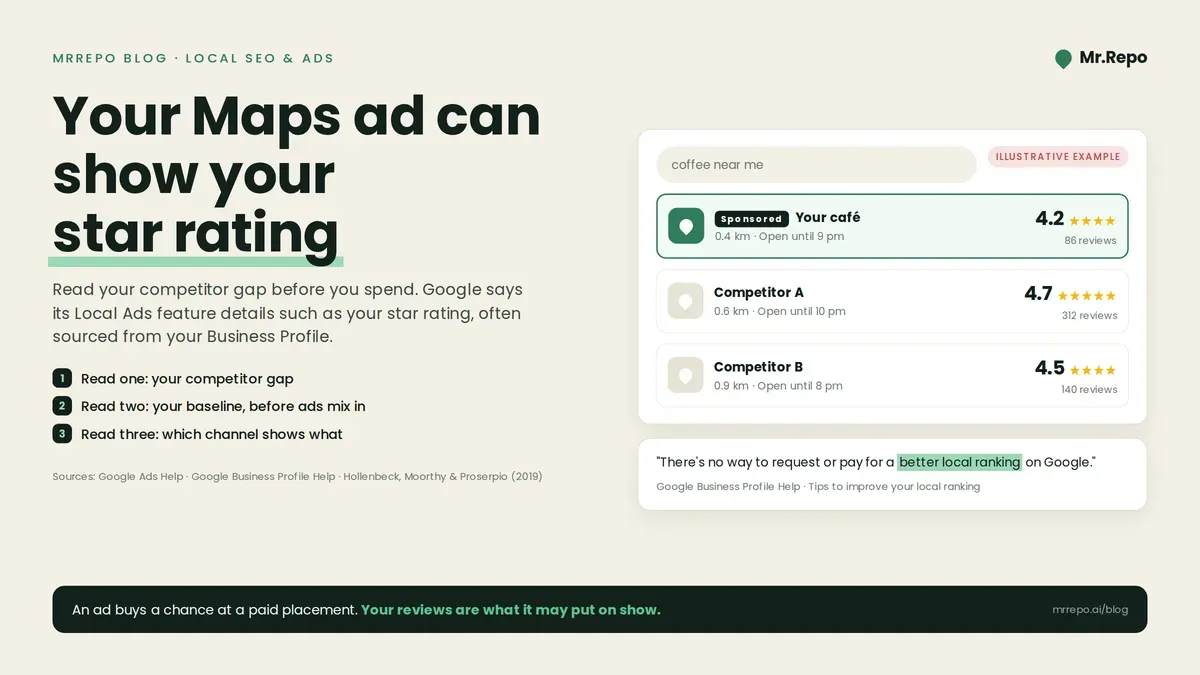
Describing its Local Ads, which can appear in Google Maps, Google Ads says they "feature key business information such as your star rating, address, phone number, store images, and store hours, often sourced from your linked Google Business Profile."
A Local Ad can carry your rating. If yours trails the business down the road, an ad may show that weaker number to more people.
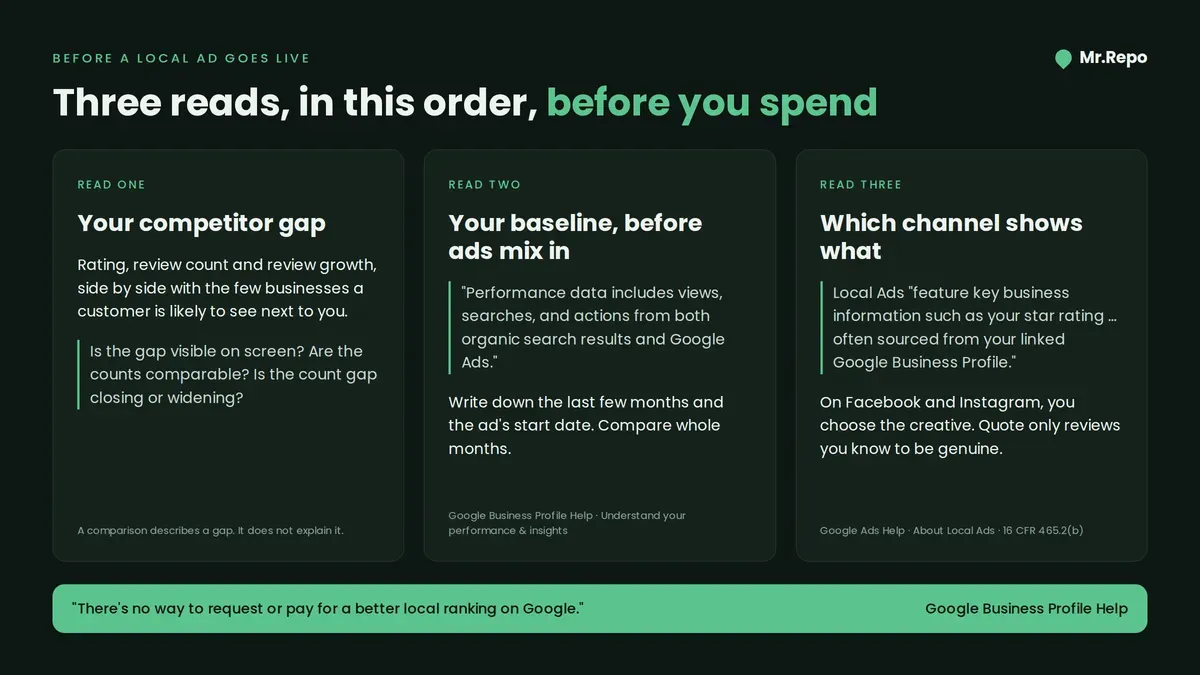
So the order of questions matters. Before you pick a channel or a budget, three reads help. First, how your rating and review count compare with the competitors a customer is likely to see next to you. Second, what your local search numbers look like before any ad runs. Third, what each ad channel shows. This post takes them one at a time, then offers a decision matrix, which we label as our own working heuristic, not research.
What Google's Maps ads can put next to your name
According to Google's help page, Local Ads "can show on the map at your location as square pins and within search results in Google Maps," and "Local Ads serve on Performance Max and Search." There is also an eligibility rule: "Advertisers must have their location assets linked at the account or campaign level to be eligible for Local Ads." Location assets show a linked Business Profile's locations in your ads. Google's location-assets page says they can display "the store address, a map to the store location, or the approximate travel distance."
The star-rating sentence says the information is often sourced from your Business Profile. "Often" is Google's word. The page does not say every Local Ad shows a rating.
On billing, Google says that for Search and Performance Max "you may be charged a standard cost-per-click (CPC)" for certain clicks. It also says that "Performance Max for store goals campaigns charge cost-per-thousand impressions (CPM) when users view a branded logo pin on Maps."
Don't confuse this with store ratings. Store ratings are a separate Google Ads feature. Google's page says "A rating of 3.5 or above is required to display a store rating on text ads," and that most merchants can obtain one after 100 or more eligible reviews from the last 24 months (the number varies). Those thresholds belong to store ratings. On our reading, the Local Ads page states no minimum rating. The store-ratings page does not say whether Business Profile reviews count toward a store rating.
What an ad cannot buy
Google's ranking page says: "There's no way to request or pay for a better local ranking on Google." The same page says "More reviews and positive ratings can help your business's local ranking."
An ad buys a chance at a paid placement. By Google's own account, it cannot buy a better unpaid ranking. Your reviews are one of the things Google says can help that ranking.
What one study says about ratings and ad spending
Our two searches for peer-reviewed work on ratings and ad clicks turned up one related study: Hollenbeck, Moorthy and Proserpio (2019), published in Marketing Science. It combined TripAdvisor reviews of US hotels with data on those hotels' advertising spending. The abstract reports that "hotels with higher ratings spend less on advertising than hotels with lower ratings," and concludes that "hotels treat TripAdvisor ratings and advertising spending as substitutes, not complements." The authors report a causal, demand-side effect of ratings on ad spending. The effect was stronger for independent hotels than for chains, and stronger in less differentiated markets.
Three limits matter for a small local business:
It is hotels. One industry, one country, one review platform.
It measures behaviour, not payoff. It shows what hotels did with ad budgets at different ratings. It does not show that advertising paid off better for lower-rated hotels, or that higher-rated hotels were right to spend less.
It is not about these ads. It does not study Google's Local Ads, or Facebook and Instagram ads.
In those two searches we found no peer-reviewed study measuring how a star rating changes clicks on Google's Maps ads. So we can't say whether, or by how much, your rating changes your Maps-ad clicks.
Read one: your competitor gap
The first read is side by side. Put your rating, review count and recent review growth next to the few businesses a customer is most likely to see beside you.
Three questions help:
Is the rating gap visible? Compare ratings as they are displayed on screen. If two businesses both display 4.4, the screen shows no gap, whatever the averages behind them.
Are the review counts comparable? Say, a 4.8 from twelve reviews and a 4.6 from four hundred may not look equally convincing, even though the first number is higher.
Which way is the count moving? Recent review growth shows whether a gap in review count is closing or widening. In our view, a widening gap argues for fixing the review flow before paying for ads.
A comparison describes a gap; it does not explain it. Rating differences can come from service, location, customer mix, or simply who was asked to leave a review. Use the comparison to decide what to look into, not as a verdict on quality.
Read two: your local baseline, before ads mix in
Google's Business Profile performance page says "Performance data includes views, searches, and actions from both organic search results and Google Ads." Once Google Ads is running, the views and actions on your profile are no longer a purely organic measure.
So before switching anything on, write down the last few months of those numbers and note the date the ad starts. Two details matter when you read them later. Views are de-duplicated by day ("A person can only be counted once a day"). And the searches metric updates monthly: "The searches metric is updated at the start of each month. It might take up to 5 days to show up." Compare whole months, and use your ads account's own reports for the paid side's clicks and cost.
Read three: which channel shows what
Google's Local Ads can show your star rating, with details often sourced from your Business Profile. On Facebook and Instagram, you choose the ad creative. Meta's targeting lets you set a radius around a location, which Meta's developer documentation gives as ".63 to 50 miles, or 1 to 80 kilometers."
So a Local Ad may carry your rating automatically; a Meta ad shows the creative you chose.
Whichever channel you use, US businesses face a legal caution. If you quote a customer's review in an ad, you may be disseminating a consumer testimonial. The FTC's rule, 16 CFR 465.2(b), bars a business from disseminating a testimonial about the business or its products or services that it "knew or should have known materially misrepresented" whether the reviewer exists, whether they had experience with the business, or what that experience was.
The rating-gap decision matrix (our working heuristic)
This matrix is the house's own reasoning. It combines the Google pages above with the one hotel study, so adjust it to your market. In every row, record your Business Profile baseline before the ad starts.
| Your displayed rating vs the competitors a customer sees next to you | Google Local Ads (can show your rating) | Facebook / Instagram ads (you choose the creative) | Before you spend |
|---|---|---|---|
| Visibly behind | Can put the gap in front of searchers. Consider waiting. | Usable. Lead with a service or an offer, not a rating claim. | Fix the review flow first: ask every customer, then recheck the comparison. |
| Level | Displayed ratings don't separate you; distance, hours and images might. | Usable for reaching people nearby. | Start small on one channel. |
| Visibly ahead | Can show your lead. | Usable. Quote only reviews you know to be genuine; see the FTC note. | Among hotels, higher ratings went with lower ad spend. That is behaviour, not proof of payoff. |
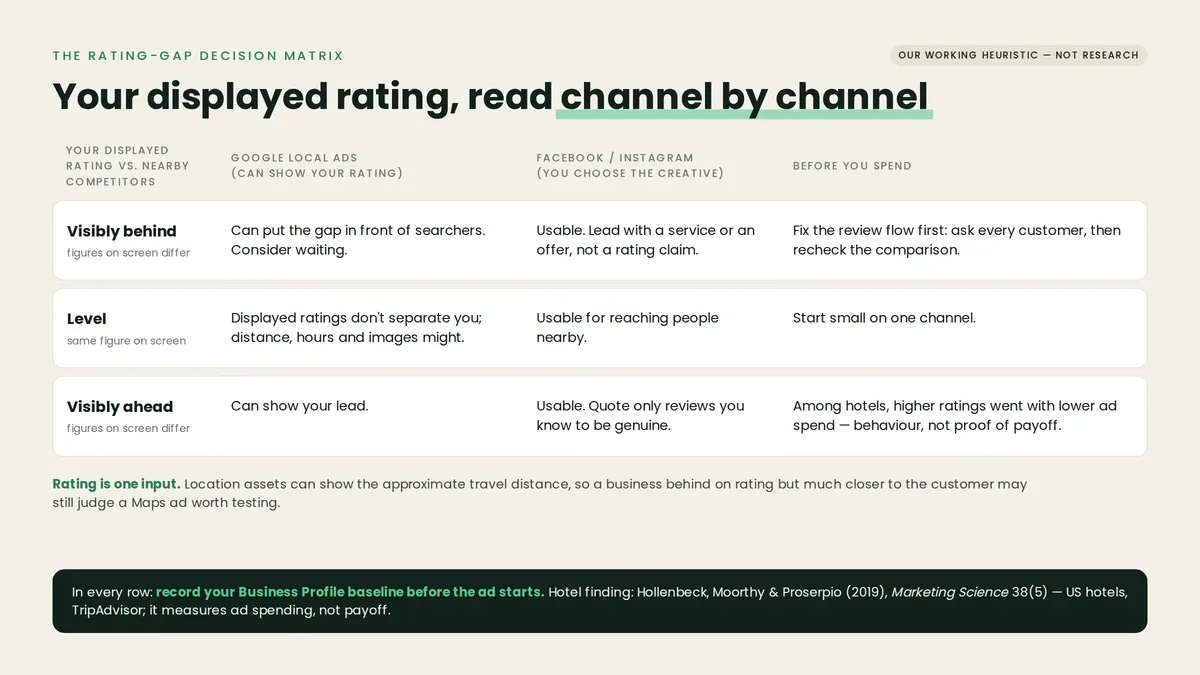
Two notes on reading it. First, "visibly" means the figures on screen differ. Second, the rating is one input among several. Location assets can show the approximate travel distance, so a business that is behind on rating but much closer to the customer may still judge a Maps ad worth testing.
Where Mr.Repo fits
Mr.Repo covers parts of these reads:
Competitor Analysis, on all plans, finds competitors near you on Google. You pick three to track and compare ratings, review counts and review growth side by side.
Local SEO is a managed service. The Mr.Repo SEO team does local search work, and a dashboard shows your local visibility score, Google rating and review velocity.
The Google Ads and Meta Ads campaign managers, on Premium and Pay As You Go, connect your own ad accounts. Meta campaigns are paused by default until you turn on spend. Google and Meta bill you directly for ad spend. You run the campaigns yourself; our team does not run them for you.
On the review side, Mr.Repo's features page lists what it deliberately doesn't do: no review gating, no fake or purchased reviews, no incentives for reviews, and no hiding negative reviews. It also states: "No one is ever blocked from leaving a public review."
Key takeaways
Google says its Local Ads, which can appear in Maps, feature details such as your star rating, often sourced from your Business Profile. It doesn't say every ad shows one.
Store ratings are a different Google Ads feature, with a 3.5 minimum on text ads and their own review thresholds. Don't apply those thresholds to Local Ads.
Google says there is no way to pay for a better local ranking. Paid placement and unpaid ranking are separate lanes.
The one related peer-reviewed study our two searches found, on US hotels, shows that higher-rated hotels spent less on advertising. It describes behaviour, not what paid off.
Record your Business Profile numbers before an ad starts. Google's performance data includes Google Ads activity.
FAQ
Will a Google Local Ad always show my star rating? Google's page says Local Ads feature details such as your star rating, often sourced from your linked Business Profile. It does not say a rating appears on every ad, so check how your own ads render.
Does running Google Ads improve my ranking in the map pack? Google says there is no way to request or pay for a better local ranking. Its ranking page says more reviews and positive ratings can help.
Is there a minimum rating to run Local Ads? We saw none on the Local Ads page. The 3.5 minimum applies to store ratings on text ads, a separate feature.
Do ads show up in my Business Profile numbers? Google says performance data includes activity from both organic results and Google Ads. Record your baseline before ads start, and compare whole months.
