How to Track Your Competitors’ Google Reviews: Manual Method vs Software
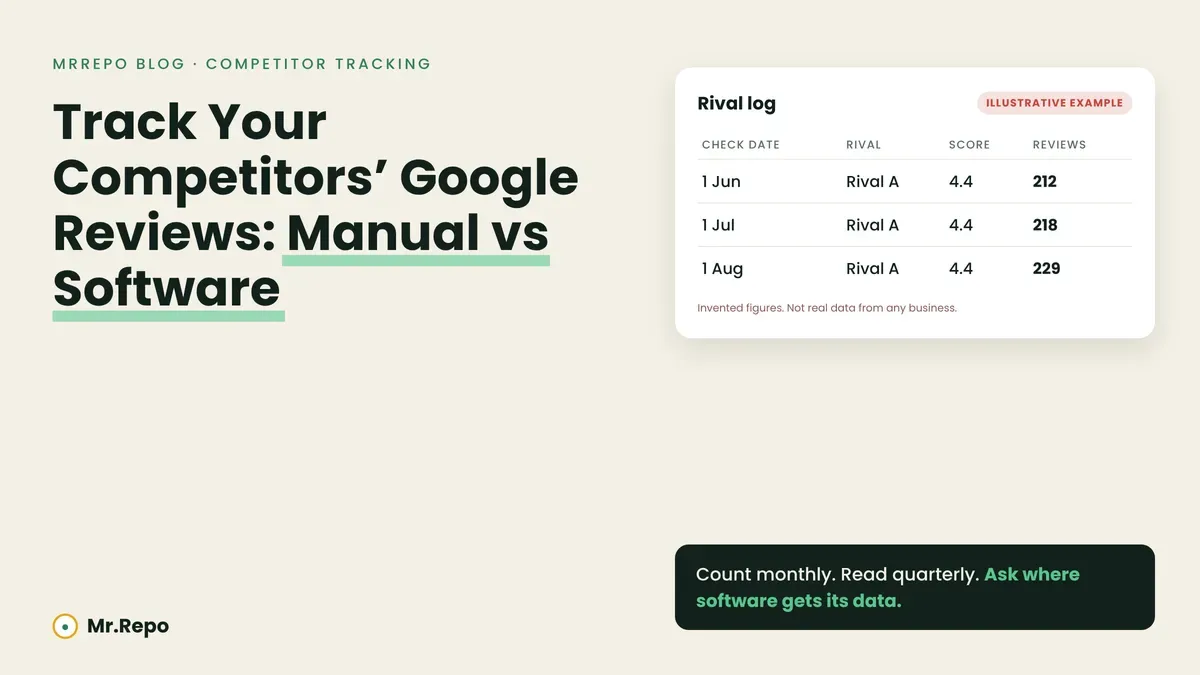
The short answer: a spreadsheet is enough if you follow two or three rivals and are willing to check them on a fixed day each month. Software may be worth it when you want history you didn’t have to remember to collect, or an alert when a rival moves ahead. Both read only what Google shows the public, and both inherit the same blind spots: a score that updates late, and counts that can fall for reasons beyond the rival’s pace.
This post covers how the numbers get collected. Two earlier posts cover the other halves: what four comparisons can and cannot tell you and which competitors are worth tracking. We don’t repeat them here.
What Google actually shows about a competitor
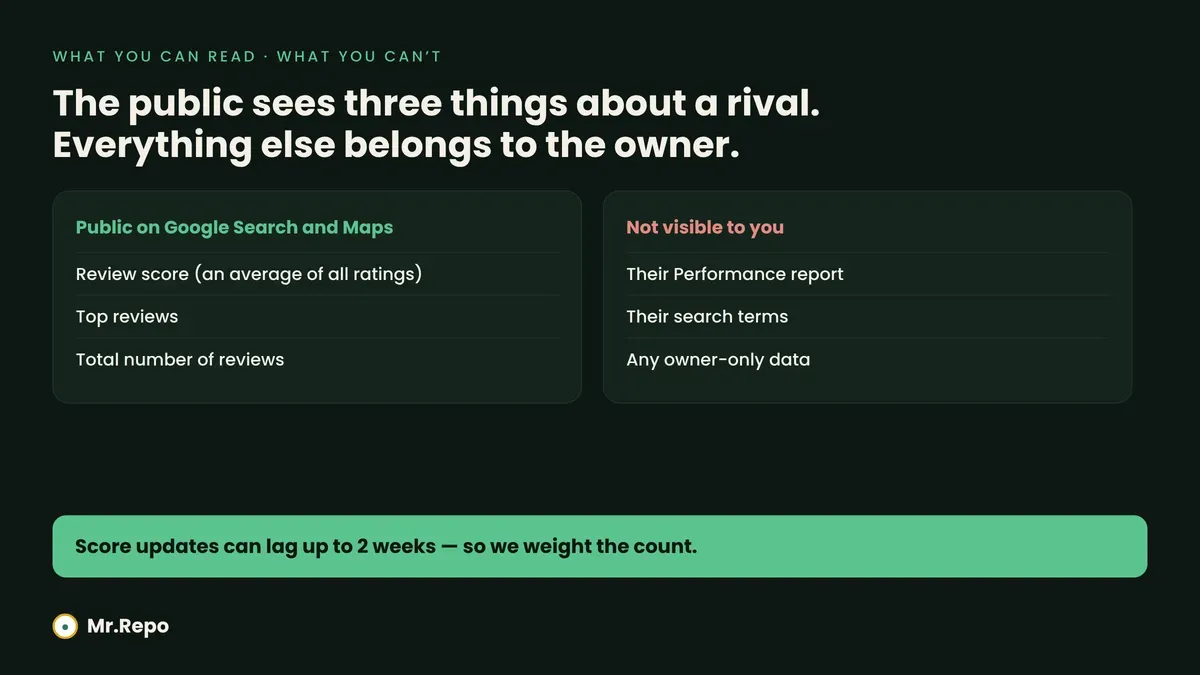
Google’s help page on review scores says that on Search and Maps you can find a place’s review score, its top reviews and its total number of reviews. That is what this post works with.
Two details on that page shape everything below. First, the score is described as “the average of all ratings published on Google for that place or business”. Second, after someone leaves a new review, the page says the updated score may take up to two weeks to appear. The page says nothing about a delay for the total count, so we don’t claim one either way.
What you cannot see is a competitor’s Performance report, their search terms or their private data. Those belong to the verified owner.
Method 1: the manual spreadsheet
This section is our working method, not Google’s guidance.
What to record. One row per rival per check: the date, the displayed score and the total number of reviews. That is three fields. You can add a fourth, a one-line note about anything unusual, such as a burst of short reviews.
Which number to trust. Track the count more than the score. Here is why, using figures we have invented for illustration. Take a business averaging 4.40 stars and add one new five-star rating:
| Reviews before | Average after one new 5-star | Move |
|---|---|---|
| 50 | 4.412 | +0.012 |
| 200 | 4.403 | +0.003 |
| 800 | 4.4007 | +0.0007 |
(These are our own arithmetic on made-up inputs, not data from any business.) The bigger the review base, the less any single review shows up in the score, and the score may lag up to two weeks. That page states no delay for the count.
How often. Weekly checks look diligent and mostly produce noise. Suppose, again as an invented example, that a rival collects about six reviews a month at a steady pace, with reviews arriving independently of one another. Under that assumption, about 25% of weeks would show zero new reviews, and about 16% would show three or more, with no change in the rival’s real pace.
Now compare four-week windows. At about 5.5 expected per window, a window with nine or more new reviews would appear roughly 11% of the time by chance. If the rival’s pace doubled to twelve a month, the same window would reach nine or more about 77% of the time. A four-week count separated the two paces more clearly in this example. Real reviews may cluster, for instance after a campaign or a busy season, so treat these percentages as a rough guide only. The same reasoning is worked through for your own count in our review velocity post.
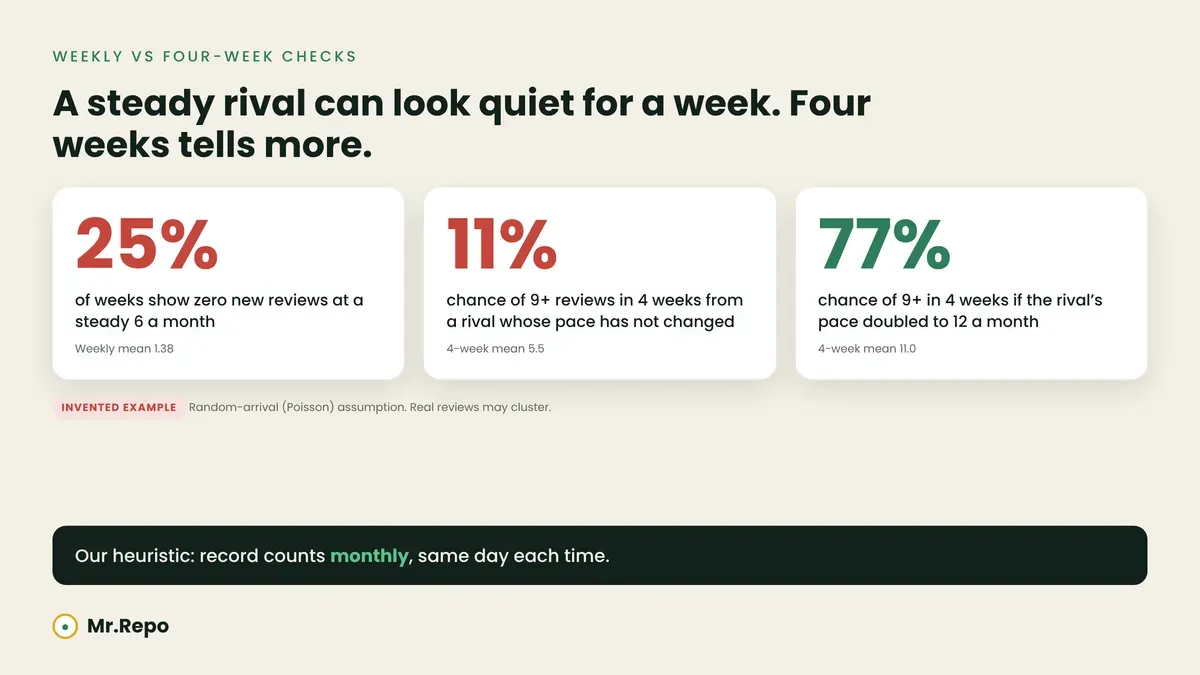
Our working rule: record counts monthly, on the same calendar day, and read a rival’s newest reviews for themes once a quarter. Those cadences are our heuristic. We did not search for an ideal interval.
What the manual method does well. It costs nothing but time, it forces you to read what customers actually say, and nothing depends on how a vendor collects data.
Where it fails. You will miss a month. Nobody will tell you the day a rival passes you. And a spreadsheet has no memory of the context behind a number.
Three traps in both methods
1. A falling count is not always a rival’s doing. Google’s help page for reviews says reviewers can edit or delete their own reviews, and that reviews are taken down if flagged or against policy. A count that drops between two checks can reflect either, and you usually can’t tell which from outside.
2. Rounding may hide small moves. The score page does not say how a displayed score is rounded, so don’t read a change in the last decimal as a trend.
3. “Recent” is relative. Google’s Places API policies page refers to a relative publish date for reviews, with “2 days ago” as its example. If you log dates by eye, you may be logging the day you looked, not the day the review was written. That is one more reason to record your own check date every time.
What Google’s terms say about collecting this data
This matters most when you evaluate software, so we read the primary documents.
The Google Maps Platform Terms of Service (last modified 26 August 2026) apply to developers who use Google’s APIs. Section 3.2.3(a) is titled “No Scraping” and lists, among examples, that a customer will not “copy and save business names, addresses, or user reviews”. A separate “No Caching” clause refers to the service-specific terms, which we did not read.
The Google Maps End User Additional Terms of Service (last modified 27 January 2026) apply to people who use Google Maps. Section 2 lists conduct you may not engage in, including redistributing, copying the content (some exceptions) and mass downloading or building bulk feeds of it.
Our reading, which is not legal advice: neither page mentions recording a competitor’s score and review count by hand. Writing two numbers and a date in a spreadsheet is not clearly covered by either page, and our own practice is to log the numbers and our own notes, not copied review text. If your situation is high-stakes, ask a lawyer.
For software buyers, the takeaway is a question rather than a verdict: how does this vendor get its data, and does it comply with the terms that apply to that route? Google’s Place Details documentation (updated 27 October 2026) lists rating, review count and reviews as fields a developer can request. Google’s Places policies page says place IDs are exempt from the caching restrictions, while other content is subject to those limits, with exceptions. That page also asks developers to credit review authors. Neither page tells us how a vendor should store a history of ratings, so we can’t say how any given tool handles it.
Method 2: software
What it does well. It checks on a schedule you don’t have to remember, keeps the history, can compare several rivals on one screen and can alert you when something changes. Those are the jobs a spreadsheet does badly.
What it doesn’t fix. It doesn’t choose the right competitors, which is a judgment about your customers. It doesn’t explain why a rival is growing. And it reads the same public numbers you do, with the same lag and the same removals.
Seven questions to ask any vendor (our checklist, not an industry standard):
Where does the data come from, and is that route consistent with Google’s terms?
How often are the numbers refreshed?
Over what window is “review growth” measured?
What happens to the history when a rival’s count falls?
Does an alert fire on the displayed score, the count or both?
Can you export the history if you leave?
What does it cost on your plan, and how many rivals does that include?
We did not test any other vendor’s product for this post, so we make no comparison.
Manual vs software at a glance
Our assessment, based on the reasoning above.
| Manual spreadsheet | Software | |
|---|---|---|
| Cost | Your time | Subscription or plan |
| Consistency | Depends on you | Depends on the tool’s schedule |
| History | Only what you recorded | Varies by tool |
| Alerts | Only your own reminders | Possible |
| Reading reviews | You read them | Varies by tool |
| Data route | Your own eyes | Ask the vendor |
| Best fit | 1–3 rivals, a monthly habit | Hands-off history and alerts |
Where MrRepo fits
MrRepo’s Competitor Analysis feature finds similar nearby businesses on Google and lets you pick three to follow. It shows ratings, review counts and review growth side by side, and flags it on your Competitors page when a rival’s rating or review count passes yours. The feature page says it uses what is public on Google, that it doesn’t help you post reviews about other businesses, and that MrRepo never writes, buys or removes reviews. It also lists themes customers praise. The page says the feature is available on all plans.
What the page does not say is how often the numbers refresh or how they are collected, so ask us before you rely on an alert. We make no claim that tracking competitors changes your ranking, rating or revenue. Three is what MrRepo’s feature tracks, not a recommendation.
What this post can’t tell you
We ran two web searches for any study comparing hand tracking with software tracking of competitor reviews and found only vendor and agency pages, which we don’t treat as evidence. We did not search academic databases. Nothing here shows that tracking rivals improves a business’s results, only that the collection methods differ in the ways described.
Key takeaways
Google shows the public a score, top reviews and a total count. That is all either method can read.
The score is an average and can lag up to two weeks, so we weight counts over the score in our examples.
Monthly counts looked better than weekly counts for spotting a changed pace in our invented example. Those cadences are our heuristic.
A falling count can come from reviewers or from Google’s removals, or from other causes.
Google’s Maps Platform terms bar API customers from copying and saving reviews. Ask any vendor how it gets its data.
Choose manual for one to three rivals and a monthly habit. Choose software for hands-off history and alerts.
FAQ
Can I look at a competitor’s Google reviews? Their score, top reviews and total count are public on Google Search and Maps. Google’s terms may limit copying and bulk downloading, so we log numbers and our own notes rather than saved review text. This is not legal advice.
How often should I check? Our heuristic is monthly for counts and quarterly for reading reviews. We did not search for an ideal interval.
Why did my rival’s count go down? Reviewers can edit or delete their own reviews, and Google removes reviews that break its policies. From outside, you usually can’t tell which happened.
Can software see more than I can? It reads the same public numbers. It can store them over time and alert you, which a person forgets to do.
Does MrRepo do this? Competitor Analysis tracks three businesses you choose and shows ratings, review counts and growth, as described above.
