Your Google Business Profile Performance Report, Explained: What Each Number Counts — and What It Doesn't
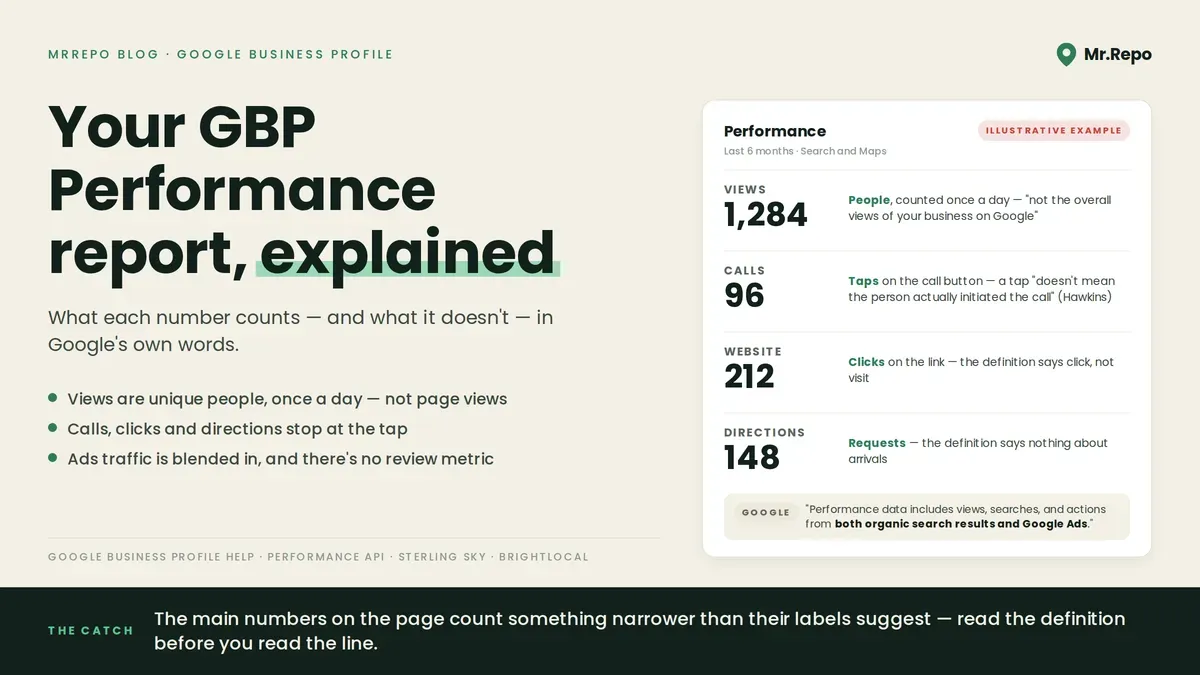
Verified Business Profiles get a report of how people found them and what they did next. It is easy to see a line move and draw a conclusion. The trouble is that the main numbers on the page count something narrower than their labels suggest. "Views" are people, not views. "Calls" are taps on a button, not conversations. And the report mixes your paid ads in with your organic traffic, and the page offers no way to split them.
This is a walk through the report using Google's own definitions, plus what a practitioner and the benchmarks add, so you know what each figure can and cannot tell you before you act on it.
What Google says the report is
The report lives under Performance on your Business Profile. Google describes it as data that "gives you insight into how people discover your Business Profile. It highlights how customers use Search and Maps to find your profile, and what actions they take once they do."
First: "Performance data includes views, searches, and actions from both organic search results and Google Ads." If you run local ads, your report is a blend, and the page describes no way to unblend it. Joy Hawkins of Sterling Sky, writing in March 2025: "There is currently no way to track Google Ads data separately from regular organic data."
Second: "Only metrics that apply to your business appear. Not all metrics are available to you." A missing row is not a zero.
One naming trap: Google calls the report Performance, while a separate feature offering "data-driven recommendations to optimize your Business Profile" is called Insights, and the bulk-download menu item is also labelled Insights.
Views: how many people, not how many times
Google defines Views as "How many people viewed your Business Profile on Search and Maps." The word is people, and Google spells out what that means. Its page says the figure "might be lower than the number of views you find on your Business Profile and email notifications", and lists reasons this "might be due to":
"The metric counts the number of unique visitors who viewed your profile."
"A user can be counted a limited number of times if they visit your Business Profile on multiple devices, such as desktop or mobile, and platforms, such as Maps or Search."
"A person can only be counted once a day. We don't count multiple visits on the same day."
"This metric only counts the views of your Business Profile and not the overall views of your business on Google."
The developer version of the same metric is called impressions, split four ways — Maps or Search, desktop or mobile — and each carries the same rule: "Multiple impressions by a unique user within a single day are counted as a single impression." Hawkins notes of impressions that "This does not mean that your profile was viewed."
Google's older Insights API reference counts it differently, defining the comparable metric as "The number of times the resource was viewed on Google Maps" — times, not people. The two definitions do not match. If old screenshots and today's report differ, check the definitions first.
Calls, directions and website clicks count taps, not outcomes
Calls are "The number of times a customer clicked on the call button on your Business Profile." The definition covers the button only, and Hawkins adds: "A click to call also doesn't mean the person actually initiated the call."
Website clicks are "The number of times people clicked on the website link on your Business Profile." Google's definition says click, not visit.
Directions are "How many people asked for directions to your business." Google's definition says nothing about arrivals. Google changed the count here: its page says "we changed how we count unique directions requests to account for" multiple taps, direction request cancellation, and spam. No date is given.
Messages count conversations and Bookings completed bookings; Products, Menus and Offers count views or clicks — Menus, for instance, are "The number of times people clicked on the menu content per user, per day." And Interactions is described only as "A summary of all your total interactions." Google's page does not say which metrics it adds up.
Searches: a monthly list of people, with a floor
The Searches section shows "The search terms people used to find your business."
It is monthly and late. Google: "The searches metric is updated at the start of each month. It might take up to 5 days to show up."
In the developer documentation each keyword's value is people, not searches: "The sum of the number of unique users that used the keyword in a month, aggregated for each month requested."
Small terms are floored. The same documentation says the value is either that sum or "A threshold that indicates that the actual value is below this threshold." The documentation does not state the threshold number, so a term shown as below it has no count at all.
Google adds that "You can't directly manage these queries." Hawkins reports the "how customers search for your business" data is "no longer available to users."
How far back it goes, and why to export
Google's help page does not say how far back the report goes. Hawkins reports that "The date range selector allows you to select from one to six months of history." If that holds for your profile, a year-over-year comparison is not on offer from the selector. Google's own download steps — Business Profile Manager, tick the profiles, Actions, Insights, choose a timeframe, Download Report — produce a spreadsheet. Run it monthly and keep the files.
No review metric on Google's list
The metric list on Google's page contains no review metric. The report is about discovery and clicks. It says nothing about the thing Google's own ranking page names as part of prominence: "This factor's also based on info like how many websites link to your business and how many reviews you have. More reviews and positive ratings can help your business's local ranking." (Note Google's "can help" — it is not a promise, and the page says nothing about replies affecting ranking.)
So the input Google says can help and the output the report measures live on different screens (we cover the review side in how Google reviews affect local SEO).
The one disclosed benchmark we found uses the old definitions
The one dataset with a disclosed sample we found is BrightLocal's 2019 study of "45,264 anonymous local businesses across 36 industries in the USA, Canada, Australia, and the UK, analyzed between September 2017 and December 2018." Its headline figures — "The average business is found in 1,009 searches per month, with 84% of these coming from discovery searches", "A typical business receives 59 actions from their Google My Business listing each month" — were computed on the old metrics, where Views were "The number of times the resource was viewed on Google Maps" and searches were split direct from discovery. Under today's definitions those numbers are not comparable to your report, and BrightLocal's method excluded businesses lacking data for the whole or a significant period. A 2026 vendor benchmark page we checked calls its data "proprietary industry benchmarks (taken from in-house performance data)" plus third-party intelligence, with no sample size. We found no benchmark on the current definitions from a named dataset with a disclosed sample. The review benchmarks post explains what to compare against instead: your own history.
How we read the report
These are our own working heuristics for the report, not findings from any study.
Compare like with like. A Views figure from a month with ads running is a different measurement from one without. Annotate your export with what changed each month — ad budget, hours, category, a burst of reviews — before you compare.
Use clicks as direction, not size. Calls, website clicks and direction requests tell you which way people leaned. Your phone log and website analytics tell you how many actually came through.
Read Searches one month behind. Check it after the 5th, and treat any term shown as below the threshold as some people, not a number.
Do not credit one action for one movement. The report blends organic and paid, deduplicates by person per day, and Google's page says it changed how it counts direction requests.
Export every month. Hawkins reports a six-month selector; your spreadsheet folder can be longer.
Where MrRepo fits is on the other side of the visit. The Performance report ends at the profile; it does not know whether the person who asked for directions had a good time. MrRepo's QR code collects that afterwards — the customer chooses a public Google review or private feedback, both options shown together — and the dashboard reports scan volume, satisfaction and the themes people raise, with a PDF export you can file next to the Google spreadsheet. You can see that side in the interactive demo.
Frequently asked questions
Why is the Views number in my report lower than the one on my profile or in emails? Google says the report figure "might be lower than the number of views you find on your Business Profile and email notifications", and lists possible reasons: the report "counts the number of unique visitors", a person "can only be counted once a day", and it counts views of the profile itself rather than "the overall views of your business on Google."
Does the Calls metric tell me how many people phoned? No. It is "The number of times a customer clicked on the call button on your Business Profile." Hawkins notes "A click to call also doesn't mean the person actually initiated the call." Use a call log or a tracking number for the actual count.
Why did my numbers drop when nothing changed? Check the documented counting explanations first: Google's page says it changed how it counts direction requests, and that Views count unique people once a day. Ads traffic is blended into the same figures, and Searches can lag by up to five days.
Can I see a full year in the report? Not from the selector, according to Joy Hawkins's March 2025 walkthrough, which describes it as running "from one to six months of history." Google's help page does not state a limit. Download the spreadsheet monthly and keep the files.
Are my reviews in the Performance report? The metric list on Google's help page contains no review metric. Reviews appear in Google's separate description of local ranking, where "More reviews and positive ratings can help your business's local ranking." Track them separately.
Key takeaways
Google's Performance report blends organic and Google Ads traffic; per Joy Hawkins, there is currently no way to separate them.
Views count unique people once a day, with limited counting across devices and platforms. Google's older API reference counts times viewed, so old and new figures do not compare.
Calls, website clicks and direction requests count taps on the profile, not phone conversations, website sessions or arrivals.
The Searches list is monthly, up to five days late, and in the API each term is unique people, with small terms shown only as below a threshold.
Google's metric list has no review row and, per Joy Hawkins, the selector caps at six months. Export it monthly, and track your reviews and customer feedback alongside it.
