Managing Google Reviews Across 10+ Locations: Access Roles, Bulk Verification and Who Replies
Multi-location Google reviews raise a problem a single profile doesn't: who can access what, who answers when a branch gets a one-star review, and whether the way you motivate branches stays inside the rules. This guide covers a Google Business Profile with multiple locations, using Google's Business Profile help pages, its Maps content policy and the FTC's review rule, all read on 26 October 2026. Our own views are labelled.
Disclosure: MrRepo sells review software, and its Google Business Profile management is listed as "coming soon" on our features page. We did not test any other vendor's product, and we have not run a bulk verification ourselves; this is a reading of Google's documentation. Google's rules change, and verification and API requirements are the most likely to. This is not legal advice.
1. Choose a Google business group structure
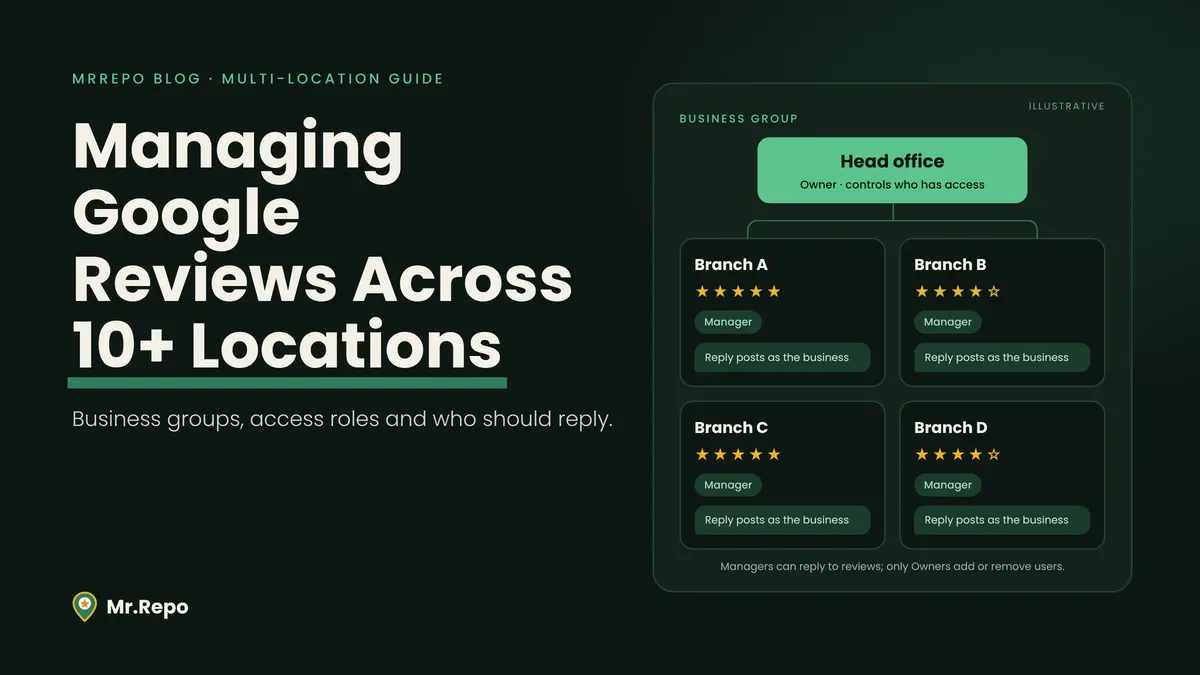
Google calls a business group a more secure way to share access with co-workers, "like a shared folder for your profiles." If your team shares one login today, Google says to move to a group instead.
Two facts shape the design. Anyone you add as a manager or owner of the group can access all current and future profiles placed in it. And Google lists a trade-off. One group gives you a single dashboard and a single spreadsheet, but owners and managers may be able to edit profiles they shouldn't. Several groups limit people to their own group's profiles, but each needs its own spreadsheet import, and you lose the single dashboard. Google also says you can add owners and managers to single profiles inside a group.
Our suggestion (opinion, untested, not a Google rule): have head office own one group, and add branch staff to their own profile rather than to the whole group.
2. Bulk verification for Google Business Profile: do you qualify?
Under 10 profiles? Skip to section 3.
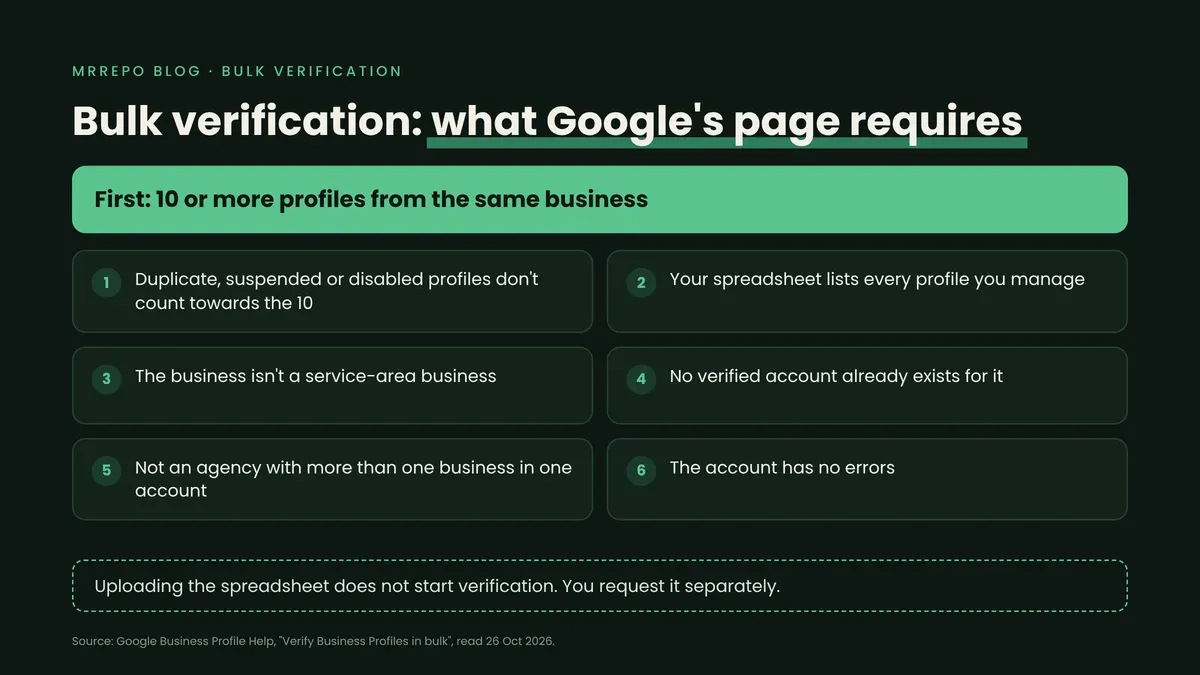
Google's bulk verification page says you can request it when your spreadsheet has 10 or more profiles from the same business. The conditions it lists:
Duplicate, suspended or disabled profiles don't count towards the 10.
The spreadsheet must include every profile you manage, because Google says it needs evidence of your business's size.
The business can't be a service-area business.
A verified account must not already exist for it.
Agencies with more than one business in one account can't bulk verify.
The account must have no errors.
Two things to note. Uploading a spreadsheet doesn't send a verification request; you start that separately in Business Profile Manager (Verifications, then Chain, then Start). And Google says you may need video verification, with an authorized representative at the profile's location.
Verification can lapse. Google says it may de-verify accounts that don't actively manage their profiles, and revokes bulk verification if an account abuses it and breaks its guidelines. Its overview also says an email address that isn't on your business domain takes longer to verify.
This matters because Google's review help says you must verify a business before you can reply to its reviews. An unverified branch can't reply to reviews.
Bulk verification: the conditions Google lists
3. Branch staff can be Managers, not Owners
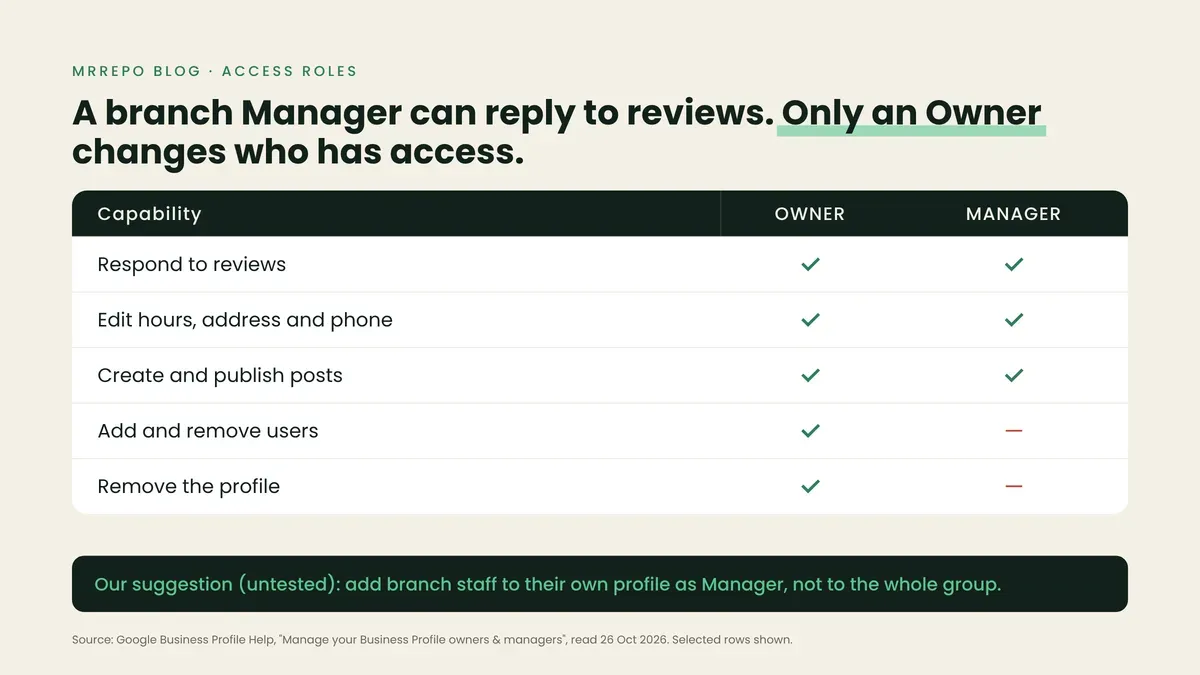
Google's roles page describes owners as having full control: they can add or remove users, manage profile info and delete the profile. A profile can have several owners but only one primary owner. Managers have mostly the same access, except they can't add or remove users or remove the profile. Google's capability table lists "Respond to reviews" for both roles.
What a branch Manager can and can't do
Four details matter once you have many people:
Individuals only. Each user needs their own Google Account, and Google says you can't add a Google Group as a manager or owner.
A waiting period. New owners and managers wait 7 days before some actions, such as deleting a profile or removing other owners.
Leavers' replies stay. When you remove a user, they lose admin ability, but Google says their past replies, posts and comments stay on the profile.
Owners control access. Only owners can remove other owners and managers, and a primary owner must transfer that status before removing themselves.
Our suggestion: make "remove access" part of every branch manager's exit checklist, and name a second owner so one resignation doesn't strand the profile.
4. Decide who replies, and what a reply is
On Google, each reply is checked against its content policies first. Google says that usually takes up to 10 minutes but can sometimes take up to 30 days. Once approved, the reply is posted publicly under the review and appears as if the business replied, without the replier's personal name. The reviewer is notified, and can still change their review afterwards. To a reader, a branch manager's reply looks like the business speaking.
Three reply models (our working framework, not research):
Central: one team replies to everything. Consistent voice, but it may miss local facts.
Local: each branch replies. Possibly faster and closer to the facts, but voice and risk vary by person.
Hybrid: branches supply the facts or a draft; a central owner approves anything involving a named employee, health, safety or a legal claim.
Our web searches on 26 October 2026 returned vendor and agency guides, and we found no peer-reviewed study comparing central and local reply models. So we can't tell you which performs better. Choose on risk instead: who is accountable if a reply discloses something about a customer? Clinics should read our HIPAA and Google reviews guide first, and our post on why you don't have to reply to every review covers triage.
If software will post replies for you, Google's API documentation (updated 28 August 2026) says applicants need a verified profile active for 60 or more days and must apply; it doesn't mention reviews. A fair question for vendors.
5. The branch target that can break Google's rules
Some multi-location firms set a monthly review target per branch, with a leaderboard. Google's Maps content policy lists, among what merchants shouldn't do when soliciting reviews, "Merchants requesting that staff solicit a certain number of reviews." It also lists staff soliciting reviews with specific content, including content that identifies a staff member.
Insiders are a separate issue. Google's policy treats content based on a conflict of interest as rating manipulation, and says that can include current or former employment. Our reading; Google gives no such example: staff of one branch reviewing a sister branch of the same company may count as a professional affiliation under that clause.
The FTC's rule adds a second layer. Under 16 CFR 465.5, an officer or manager who writes a review of their own business needs a clear and conspicuous disclosure of their material relationship to it. Section 465.5(c) restricts soliciting reviews from employees, agents or immediate relatives, but only under conditions that include a review appearing without disclosure; read it in full. Sections 465.5(b)(2) and (c)(2) carve out generalized solicitations to purchasers, so under the FTC rule a counter QR code for every customer differs from a manager asking the team and their families for undisclosed five-star reviews. Again, this is not legal advice; see our post on review requests that break the rules.
Our suggestion: replace "get 30 reviews" with targets staff fully control, such as asking every customer the same way and following up on private feedback. This is a heuristic, not research.
6. Comparing branches: why the bottom of the table may be noise
ILLUSTRATIVE: our arithmetic under an assumption, not data. Suppose 20 identical branches each expect 12 new Google reviews a month, arriving independently (an assumption). A given branch then gets 8 or fewer in a month 15.5% of the time, so about 3 of 20 would be expected to look "behind," and the chance that at least one of the 20 gets 6 or fewer is about 61%. Real branches differ, but one month's count mixes real differences with chance. Our review velocity post covers the single-business version; look at several months before you reward or warn a branch.
Where MrRepo fits
Product details are as of 26 October 2026, from MrRepo's own pages (not an independent test). MrRepo generates QR codes where customers choose a public Google or Yelp review or private feedback; its features page says no one is blocked from the public option, and describes reputation analytics that show how sentiment breaks down across your locations.
The pricing page counts QR campaigns, not locations: Free (a 14-day trial) includes 1, Pro up to 5, Premium unlimited. The features and pricing pages we read do not describe role-based access for branch staff. Google Business Profile management, meaning connecting your profile and replying to reviews inside MrRepo, is listed as coming soon, so today you reply in Google's own tools as described above. See features and pricing.
FAQ
How many locations do I need for bulk verification? Google's page says your spreadsheet needs 10 or more profiles from the same business. Duplicate, suspended and disabled profiles don't count, and service-area businesses aren't eligible. If you lack enough, Google says to verify profiles individually.
Can a branch manager see only their own branch? Google doesn't say. It says you can add owners and managers to single profiles inside a group, and that someone added at group level can access all current and future profiles in it.
Can I manage a Google Business Profile with multiple locations without bulk verification? Yes. Bulk verification is a separate step for 10 or more eligible profiles; Google says to verify individually if you lack enough.
Whose name appears on a reply? Google says a reply appears as if the business replied, and the replier's personal name isn't shown.
Can an agency bulk verify? Google says agencies with more than one business in one account can't. Google has a separate section for agencies managing Business Profiles, which we did not review here.
Key takeaways
Choose one business group or several; Google lists trade-offs, and says staff can be added to single profiles.
Bulk verification needs 10 or more eligible profiles, and uploading a spreadsheet does not start it.
Managers can reply to reviews but can't add or remove users; remove leavers promptly; their past replies stay either way.
Branch review-count targets can conflict with Google's policy on staff soliciting reviews; ask every customer the same way.
One month's review count per branch can mislead; look across several months.
