Review Widgets on Your Website: What Google Allows and What Quietly Costs You (2026)
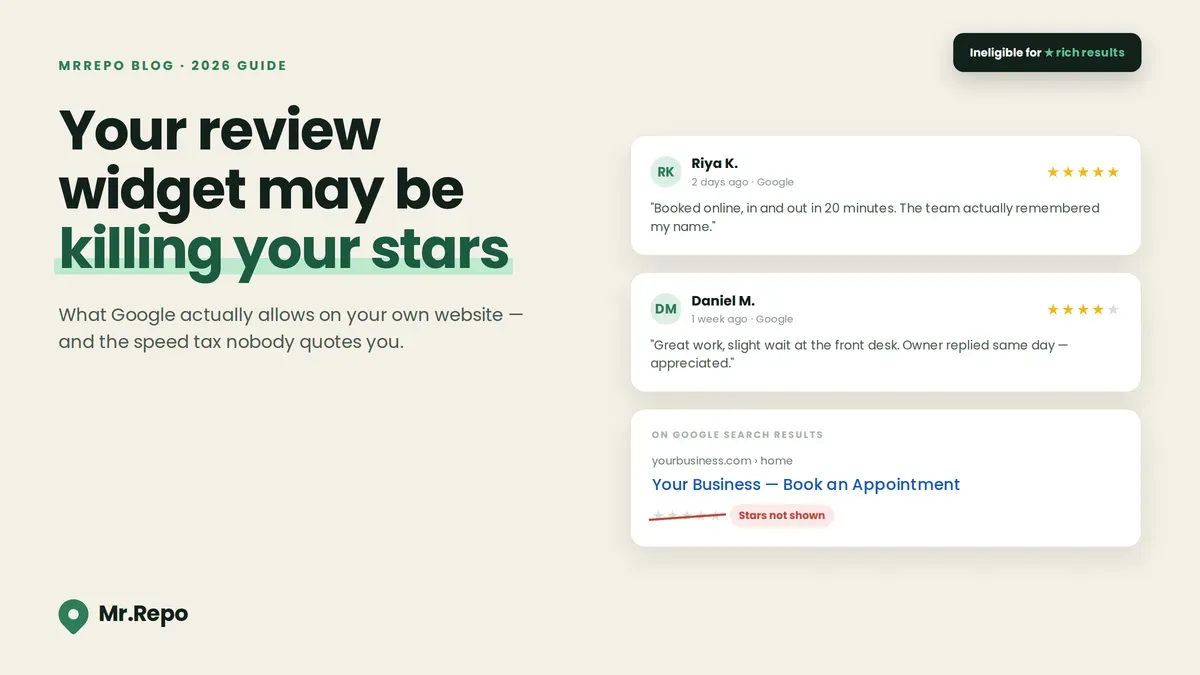
You added a review widget to your homepage. Five gold stars, a slider of happy customers, a "4.9 out of 5" badge sitting right above your booking button. It looks like trust. It looks like the thing every marketing guide told you to do.
Here is the part almost nobody tells you: that widget may have just made your website ineligible for the star ratings Google shows in search results. Not penalised. Not flagged. Just quietly switched off — with no notification, no Search Console message, and no obvious way to connect the cause to the effect.
This is one of the strangest corners of local SEO, because the advice is genuinely counter-intuitive. Displaying your own reviews on your own website is good for conversion and neutral-to-negative for search appearance. Those two things pull in opposite directions, and most widget vendors will not mention it, because the widget is the product.
This guide covers what Google's documentation actually says (quoted directly), how to check whether your own site has the problem, what the widget is costing you in page speed, where the FTC's consumer review rule draws the line on which reviews you show, and what the research says actually moves conversion — which turns out to be a different thing from what most widgets are optimised for.
The two places your stars can appear — and only one of them is Google's to give
Before anything else, separate two concepts that people constantly merge:
On-page display. Reviews rendered on your own website, visible to someone already looking at your page. You control this completely. Google has no say in it.
Rich results (star snippets). The gold stars that appear inside Google's search results under your page's title. These come from structured data — machine-readable markup in your page's code — and Google decides entirely on its own whether to display them.
Nobody is going to stop you from putting five stars on your homepage. The question is whether the markup underneath those stars earns you stars in the SERP, or gets your page silently excluded from the feature. (If you want the broader picture of how reviews feed your search visibility, start with our guide to how Google reviews impact local SEO and Map Pack ranking.)
The answer, for a local business displaying its own reviews, is almost always: excluded.
Google's self-serving review rule, quoted directly
Google's Review Snippet documentation (last updated 24 July 2026) states the rule plainly:
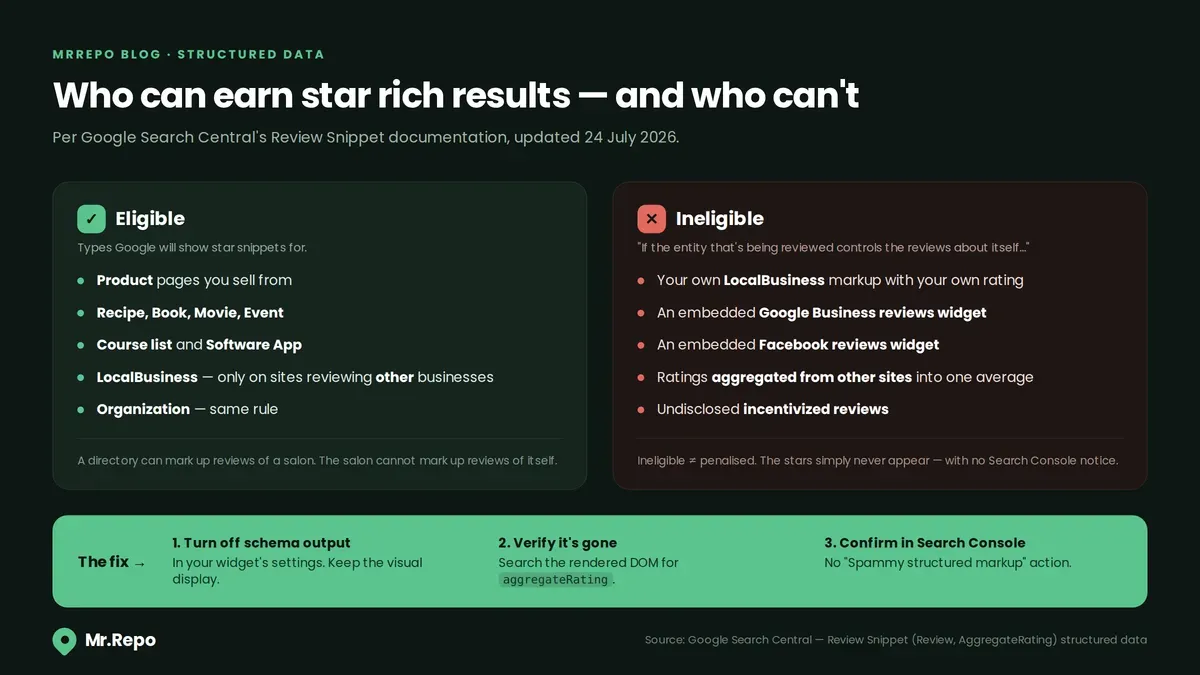
"If the entity that's being reviewed controls the reviews about itself, their pages that use LocalBusiness or any other type of Organization structured data are ineligible for star review feature."
And then Google gives the example that matters most here — the one that names widgets explicitly:
"a review about entity A is placed on the website of entity A, either directly in their structured data or through an embedded third-party widget (for example, Google Business reviews or Facebook reviews widget)."
Read that second quote twice. Google is not describing a hypothetical. It is describing the exact product sold by dozens of "display your Google reviews on your website" plugins. If your widget injects AggregateRating or Review markup about your own business into your own page, Google's stated position is that the page is ineligible for the star feature.
Which schema types can still earn stars
Google's documentation lists the features you can supply ratings for. The ones a local business is likely to have on its site:
Product
Course list
Event
Book, Movie, Recipe, Software App
Local business — "only for sites that capture reviews about other local businesses"
Google supports reviews on a further set of schema.org types too — Organization (with the same "only for sites that capture reviews about other organizations" restriction), plus CreativeWorkSeason, CreativeWorkSeries, Episode, Game, MediaObject, MusicPlaylist and MusicRecording. Those matter to publishers and media sites rather than to a salon or a clinic, but check the source list if your site is unusual.
That parenthetical is the whole ballgame. Yelp can mark up reviews of a restaurant. The restaurant cannot mark up reviews of itself. The LocalBusiness documentation repeats it: aggregateRating and review are "only recommended for sites that capture reviews about other local businesses."
Three more rules that catch people out
Don't aggregate reviews from other sites. Google's guidance is direct: "Don't aggregate reviews or ratings from other websites." A widget that pulls your Google rating, your Facebook rating, and your Yelp rating and averages them into one "4.8 across all platforms" number is doing precisely the thing the documentation prohibits.
Don't include undisclosed incentivized reviews. Google prohibits "fake or undisclosed incentivized reviews on your page or in your structured data markup" — defined as "reviews written in exchange for a benefit (such as money, discounts, vouchers, or free products) that don't clearly and prominently disclose the incentivization." Worth noting that Google's Business Profile policy bans review incentives outright, so for Google reviews specifically this is not a disclosure problem to solve — it is a practice to avoid.
aggregateRating needs a count. If you do mark up reviews legitimately, at least one of ratingCount or reviewCount is required. If bestRating is omitted, Google assumes 5; if worstRating is omitted, it assumes 1.
The honest caveat
Google's documentation says these pages are ineligible for the feature. It does not say they trigger a penalty. There is a meaningful difference: ineligibility means the stars don't show, while a manual action ("Spammy structured markup") is a separate, more serious enforcement path that appears in Search Console and can affect how your pages rank.
Marking up self-serving reviews will generally get you the first outcome, not the second. But structured data that misrepresents your page — inflated ratings, ratings for content that isn't on the page, invented review counts — is a different category of problem, and that one does show up in Search Console. Don't let a widget's default settings decide which category you're in.
How to check your own site in about four minutes
Do not take a vendor's word for what its widget injects. Check.
1. Search your source for the markup. Open your homepage, view the page source, and search for aggregateRating. Then load the page in your browser's developer tools and search the rendered DOM for the same string — many widgets inject markup via JavaScript after the initial HTML loads, so it won't appear in view-source but will appear in the DOM. Google renders JavaScript, so it sees the injected version.
2. Run Google's Rich Results Test. Paste your URL in. It reports which structured data Google detects on the rendered page and which rich result types the page qualifies for. If it detects Review or AggregateRating on a page that also carries LocalBusiness markup about you, you have found your answer.
3. Check Search Console. Under Security & Manual Actions, confirm there is no "Spammy structured markup" action — an empty panel is the good outcome. Under Enhancements, a "Review snippets" report only appears when Google actually detects that markup on your site, so its absence tells you something useful too.
4. Check whether the widget is your only source of markup. Some businesses have AggregateRating in three places at once: the theme, an SEO plugin, and the review widget. Conflicting markup is worse than none.
If you find self-serving markup, the fix is to keep the visual widget and strip the structured data. Many widget tools expose a toggle for this, usually somewhere in the settings under a name like "schema markup" or "rich snippets" — if yours does, switch it off. If it doesn't, ask the vendor directly whether the markup can be disabled, and treat "no" as a reason to change tools. The reviews still display to humans either way. The markup stops making claims Google won't honour.
The speed tax nobody quotes you
The compliance issue is invisible. The performance issue is measurable, and it hits every visitor.
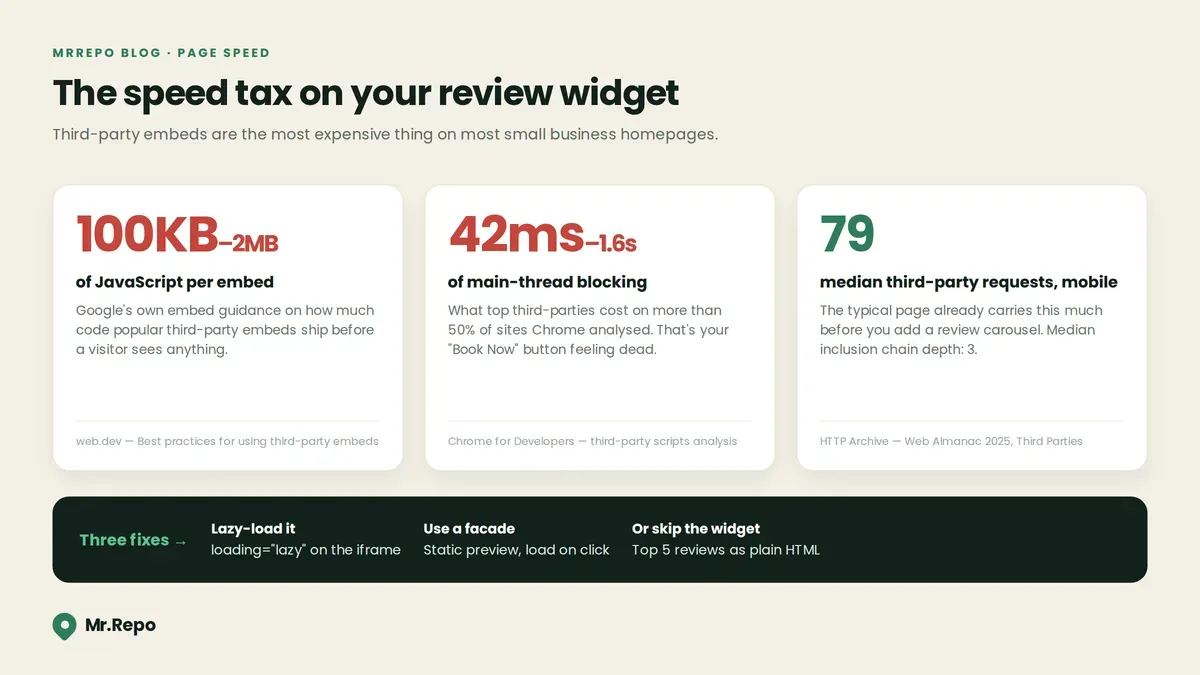
Review widgets are third-party embeds, and third-party embeds are expensive. Chrome's developer team, citing the HTTP Archive's 2021 Web Almanac, noted that "some of the top third-parties have been known to block the main thread from 42 ms to 1.6 s for more than 50% of the sites analysed." Google's own embed guidance is blunter about size: "Many popular embeds include over 100 KB of JavaScript, sometimes even going up to 2 MB."
For context on how loaded the average page already is, the HTTP Archive's 2025 Web Almanac found that 90% or more of pages use third-party resources, with a median of 79 third-party requests on mobile and 83 on desktop — and a median third-party inclusion chain depth of 3, meaning most third parties load further third parties you never chose.
Main-thread blocking is a primary driver of poor Interaction to Next Paint — INP measures the latency of a user's interactions, and a busy main thread is the most common reason that latency balloons. (Total Blocking Time is the lab metric that measures the blocking directly.) A visitor taps "Book Now", the main thread is busy parsing your review widget's JavaScript, and the button feels dead for half a second. That is a conversion problem wearing a performance costume.
Three fixes that work
Lazy-load it. Add loading="lazy" to widget iframes. Google's guidance notes that lazy-loading a single YouTube embed "can save approximately 500 KB on the initial page load"; the same principle applies to any below-the-fold embed. Your review carousel almost certainly sits below the fold.
Use a facade. A facade is a lightweight static placeholder that looks like the embed and only loads the real thing on click or scroll. Google cites lite-youtube-embed as "224 times faster" than the real YouTube embed. For reviews, the facade is even easier: render your three best review quotes as plain server-side HTML, and load the interactive widget only if someone scrolls to it.
Reserve the space. Set explicit width and height on the widget container. Without it, the widget pops in after load, shoves your page down, and hurts Cumulative Layout Shift.
The best-performing version of a review widget, for most small business sites, is not a widget at all. It is a handful of real review quotes written into your page as ordinary text and HTML. Zero JavaScript, zero third-party requests, instant render, fully crawlable, and — because it makes no structured-data claims about itself — zero structured-data exposure. Note the qualifier: the FTC rules in the next section still apply in full to anything you hand-place on the page, and arguably apply more forcefully, because hand-picked quotes are unambiguously something you published rather than something you hosted.
The FTC rule on which reviews you display
Choosing what to show is where the legal line sits, and the rule here is more nuanced than most summaries admit.
The FTC's Rule on the Use of Consumer Reviews and Testimonials (16 CFR Part 465) took effect 21 October 2024. Section 465.7 covers Review Suppression, and § 465.6 covers company-controlled review websites. Knowing violations can draw civil penalties of up to $53,088 per violation — a figure that comes from 16 CFR 1.98 rather than from Part 465 itself, and that has not been adjusted since January 2025. That "knowing" qualifier matters: this is not automatic per-review exposure for an honest mistake.
The nuance most articles get wrong: the FTC does not require you to display every review you receive. Its own guidance states plainly that "organizing reviews is not suppressing reviews under the rule." Sorting by most recent, by most helpful, or by relevance is fine. The FTC also answers "Yes" to whether a business may refuse to publish a review that is, in the question's words, "about the wrong business and is thus patently false."
What crosses the line is the impression you create. The FTC's guidance warns that "organizing reviews in a way that makes it difficult for consumers to know about or find negative reviews could be an unfair or deceptive act." The problem is not selection — it is implying the selection is the whole. A widget headed "What our customers say" that silently shows only 5-star reviews, next to a "4.9 average from 320 reviews" badge, is inviting the visitor to believe they are seeing a representative sample. They are not.
And the FTC is explicit that hosting is not a defence when the content is on your own site: "A business that puts testimonials on its own website is disseminating them and is not merely 'hosting' them. If those testimonials are fake or false, the business could be liable."
The practical version
Don't filter by star rating in a way that implies completeness. Either show a genuine mix, or make the curation obvious ("A few of our favourite reviews") and link to the unfiltered source.
Link out to the real profile. A prominent "Read all 320 reviews on Google" link resolves nearly all of this, because the full distribution is one click away.
Don't display reviews you suspect are fake. If a competitor or bot has left reviews on your Google profile, report and remove them at the source rather than filtering them out of your widget.
Never write or commission the reviews. § 465.5 covers insider reviews, in three prongs: reviews written by officers or managers without disclosure; the business disseminating testimonials from officers, managers, employees or agents without disclosure; and officers or managers soliciting reviews from relatives or employees in ways that discourage or ignore disclosure. It is not a blanket ban — an unsolicited review from an employee's cousin that you never republish is not covered — but the moment you put an insider's words on your own page, disclosure is required.
If your rating badge shows an average, make sure it's the real average across all reviews, not the average of the ones you chose to display.
This is general information, not legal advice. If your display practices are complex or your industry is regulated, have a lawyer review them.
If you're pulling reviews via Google's API, read the policies
Businesses that build their own review display using the Google Places API pick up a separate set of obligations:
Place IDs can be stored indefinitely. Other Places API content cannot be pre-fetched, cached, or stored beyond the documented exceptions.
Attribution is required. Google's policy: attribution "should take the form of the Google Maps logo whenever possible. In cases where space is limited, the text Google Maps is acceptable."
Credit the author. "You must always credit the author when displaying photos or reviews. Each photo and review includes an author attribution (author's avatar image, name, and profile link)." Stripping the reviewer's name and avatar to make your carousel tidier is a policy violation.
Disclose your ordering. You must "include a clear notice that describes how reviews are being ordered and filtered including any search criteria applied." That last clause is the important one — it obliges you to disclose the criteria, not just the fact of filtering. Google is asking for the same transparency the FTC is.
What actually moves conversion (and it isn't the carousel)
Now the useful half. Reviews on your own site do work — the research on this is genuinely strong. It just doesn't reward the things widgets are usually configured to emphasise.
Northwestern University's Spiegel Research Center, in a 2017 analysis of e-commerce product reviews, found:
Purchase likelihood for a product with five reviews is 270% greater than for one with no reviews. The first five reviews do the heavy lifting; gains flatten sharply after that.
Purchase likelihood peaks in the 4.0–4.7 range and declines as ratings approach 5.0. A perfect score reads as filtered. It costs you.
Reviews mattered far more for expensive purchases — a 190% conversion lift on lower-priced items versus 380% on higher-priced ones.
Verified buyer badges improved purchase odds by 15%.
Worth stating the limits honestly: that study measured product-page conversion in e-commerce, not appointment bookings at a local clinic, and it is now nine years old. Treat it as a strong signal about how humans read star ratings, not as a measured result for your industry.
Pair that with BrightLocal's Local Consumer Review Survey 2026 (1,002 US adults, published 11 February 2026):
97% of consumers read reviews when choosing a local business, and they consult around six different review sites.
47% won't use a business with fewer than 20 reviews.
74% prioritise reviews from the last three months, and 32% want reviews from within the last two weeks — up from 20% a year earlier.
31% now require 4.5 stars or better, up from 17% in 2025. 68% require 4+.
50% are unlikely to choose a business that posts templated or generic responses, and 81% expect a response within a week.
Put those two datasets side by side and the design brief writes itself:
Show dates. Recency has become one of the sharpest expectations consumers hold, and it is tightening fast — the share wanting reviews from within the last two weeks jumped from 20% to 32% in a single year. A widget that hides review dates is hiding the thing 74% of people are looking for.
Show the count, not just the average. "4.6 ★ from 214 reviews" beats "4.6 ★" because volume is its own threshold — 47% of people are screening for at least 20.
Show your responses. A review with a thoughtful owner reply underneath is a stronger trust signal than a review alone. It demonstrates you engage, and it puts your side of any criticism on the record. If your replies are the weak link, our step-by-step guides to responding to negative reviews and responding to positive reviews cover the wording.
Include a couple of 4-star reviews. This is the recommendation people resist most. The evidence is indirect — Spiegel measured how a displayed aggregate rating affects purchase likelihood, not how a curated review carousel performs — but it points one way: a perfect score reads as filtered, and a wall of nothing but 5-star reviews is exactly the pattern that raises FTC exposure. A 4-star review with a specific, mild criticism and a good owner reply is more persuasive than a tenth "Great service!!"
Don't hide the source. Link every quote to the live Google review. Verifiability is the whole reason reviews outperform your own marketing copy — the moment reviews live only on your site, unverifiable, you have converted social proof back into advertising.
The compliant, fast, persuasive setup
A checklist you can hand to whoever maintains your site:
Turn off schema/rich-snippet output in your review widget's settings. Keep the visual display.
Verify with the Rich Results Test that no self-serving
RevieworAggregateRatingmarkup remains on the page.Confirm Search Console shows no "Spammy structured markup" manual action.
Render your top 3–5 reviews as plain HTML in the page source, above any JavaScript widget. Fast, crawlable, and it works if the widget fails.
Lazy-load or facade the interactive widget and give its container fixed dimensions.
Display date, reviewer name, star rating, and your reply on every review shown.
Show the true total count and true average, and link to the unfiltered Google profile with clear anchor text.
Include at least one review below 5 stars, with your response.
Never filter to 4-and-5-star only without an obvious, honest label about what you're showing.
Re-check speed in PageSpeed Insights before and after adding the widget, and read the "Reduce the impact of third-party code" audit — it breaks out size and main-thread blocking time by provider, so you can see your widget's line item specifically. If it's the largest entry on that list, replace it with static HTML.
Note what this checklist does not say: it never tells you to stop collecting reviews, and it never suggests choosing which customers to ask. The compliant path to a strong on-site review section is the same as the compliant path everywhere else — ask everyone, respond to everything, and display honestly. Filtering who you ask is review gating, and Google bans it — the on-site version of the same instinct is what the FTC section above is about.
That is exactly the workflow MrRepo is built around: every customer gets the same QR code, the same two options, and no gating in between. Where you put that code matters more than most owners expect — see where to put your feedback QR code so people actually scan it. You can try the interactive demo to see the flow.
Frequently Asked Questions
1- Will embedding a Google reviews widget get my site penalised?
Almost certainly not penalised — but likely made ineligible for star rich results, if the widget injects review markup. Google's documentation says pages where the reviewed entity controls the reviews about itself are "ineligible for star review feature" and names embedded Google Business and Facebook review widgets as an example. Ineligibility means the stars don't show. A manual action for spammy structured markup is a separate and more serious matter, generally triggered by markup that misrepresents the page rather than by self-serving markup alone.
2- Can I show reviews on my website at all?
Yes, absolutely. The rule is about structured data, not about display. Show as many reviews as you like — just don't mark them up as Review or AggregateRating about your own business, and don't imply a curated selection is the complete picture.
3- Which pages can still get star rich results?
Product, Recipe, Book, Course list, Event, Movie, and Software App pages, plus LocalBusiness and Organization markup on sites that review other businesses. Google supports reviews on several media-oriented types as well — Game, Episode, MusicRecording and similar — which rarely apply to a local business. If you sell products or run courses through your site, those pages are legitimately eligible; the restriction applies to reviews of you as a business.
4- My widget shows a combined rating from Google, Facebook, and Yelp. Is that a problem?
For structured data, yes — Google's guidance says "Don't aggregate reviews or ratings from other websites." As a visual element with clear per-platform attribution it can still be useful to visitors, but it should never be marked up as an AggregateRating for your business.
5- Am I legally required to display every review I get?
No. The FTC states that "organizing reviews is not suppressing reviews under the rule," and it confirms you may decline a review that is about the wrong business and thus patently false. What creates risk is arranging things so that negative reviews are hard to find while implying the display is representative. Curate openly and link to the full profile.
6- Do review widgets actually slow my site down?
Usually yes, and often more than owners expect. Google's guidance notes popular embeds can carry "over 100 KB of JavaScript, sometimes even going up to 2 MB," and Chrome's developers have cited Web Almanac data showing some top third-parties blocking the main thread from 42 ms to 1.6 seconds on more than half of the sites analysed. Lazy-loading, facades, and static HTML fallbacks all reduce this substantially.
7- Should I show only my 5-star reviews?
No — and this is one of the rare cases where the ethical answer and the profitable answer point the same way. Spiegel's 2017 e-commerce research found purchase likelihood peaks between 4.0 and 4.7 and declines as ratings approach 5.0, because a perfect score reads as filtered. A well-answered 4-star review does more for you than another anonymous rave, and it reduces your FTC exposure at the same time.
Key Takeaways
Google's rule is about who controls the reviews. If you display reviews about yourself, your
LocalBusinessorOrganizationpages are ineligible for star rich results — and Google's documentation explicitly names embedded Google and Facebook review widgets as an example.Display and markup are separate decisions. Keep the reviews visible to humans; turn off the widget's structured-data output. You lose nothing you were actually getting.
Check, don't assume. Search your rendered DOM for
aggregateRating, run the Rich Results Test, and confirm Search Console shows no manual action. Four minutes.Widgets carry a real speed cost. 100 KB to 2 MB of JavaScript per embed, and some top third-parties have been measured blocking the main thread for up to 1.6 seconds. Lazy-load it, facade it, or replace it with static HTML.
The FTC cares about the impression, not the selection. Organising reviews is allowed; making negative reviews hard to find while implying completeness is not. Knowing violations can draw civil penalties of up to $53,088 each.
A perfect 5.0 converts worse than a 4.6. Purchase likelihood peaks at 4.0–4.7 and falls as ratings approach 5.0. Show dates, counts, your replies, and at least one imperfect review.
Recency is the new bar. 74% of consumers prioritise reviews from the last three months. A steady collection habit beats a one-time push, and it is the only thing that keeps an on-site review section honest and current.
