How to Ask for Google Reviews: Scripts for Text, Email & In Person (2026)
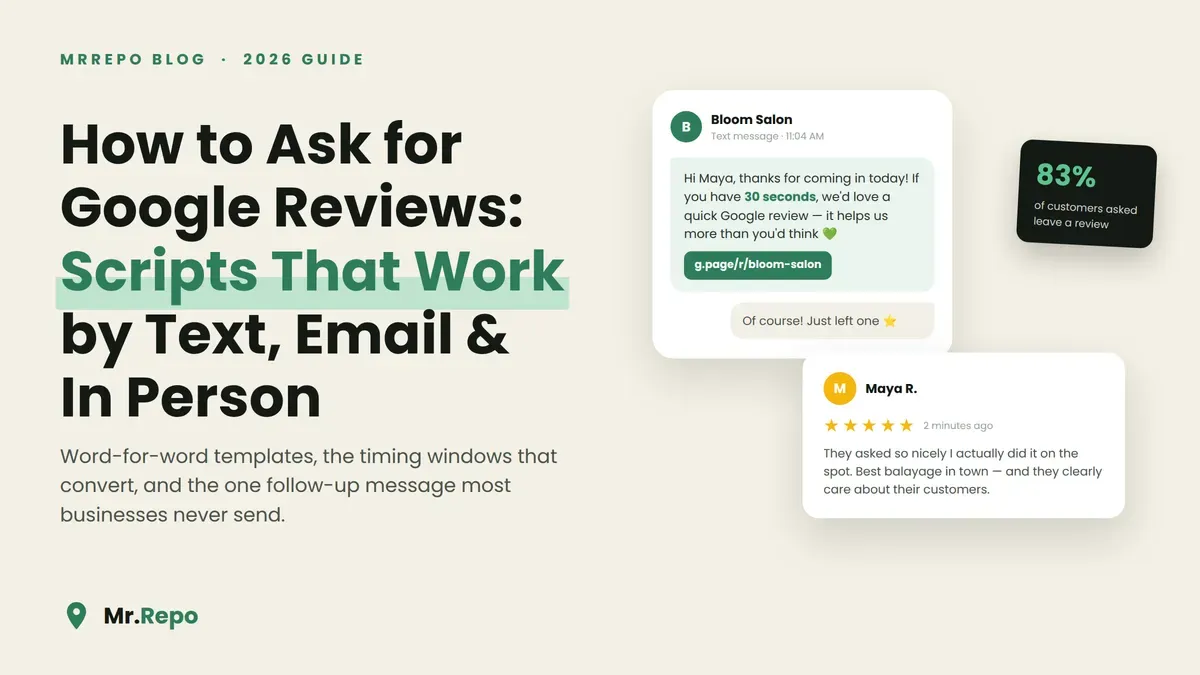
Here's a number worth sitting with: according to BrightLocal's 2026 Local Consumer Review Survey, 83% of customers who are asked to leave a review actually go and do it.
Not 8%. Eighty-three.
Meanwhile, left to their own devices, only about 1–2% of customers ever review a business unprompted. The gap between those two numbers is the single biggest lever most small businesses never pull. Your happiest customers aren't refusing to review you — they simply haven't been asked, or they were asked so awkwardly ("um, if you get a chance, maybe, no pressure…") that the moment died on the spot.
This guide fixes that. You'll get word-for-word scripts for the three channels that matter — in person, SMS, and email — plus the timing windows that make each one work, the follow-up message that quietly produces a third of your reviews, and the two rules from Google and the FTC you must not break while doing any of it.
Why asking works (and why almost nobody does it well)
Reviews don't happen at the moment of satisfaction. They happen at the moment of friction removal. A delighted customer walks out of your café, gets in the car, hits traffic, picks up the kids — and the glowing review they genuinely intended to write evaporates. It's the same silent customer problem that hides most of your feedback: satisfaction is common, expression is rare.
Asking collapses that friction. The 2026 BrightLocal data shows 78% of consumers were asked to leave a review in the past year — which means your competitors are already asking — and the 83% follow-through rate among those asked tells you the demand side isn't the problem. The ask is.
But channel and timing change everything:
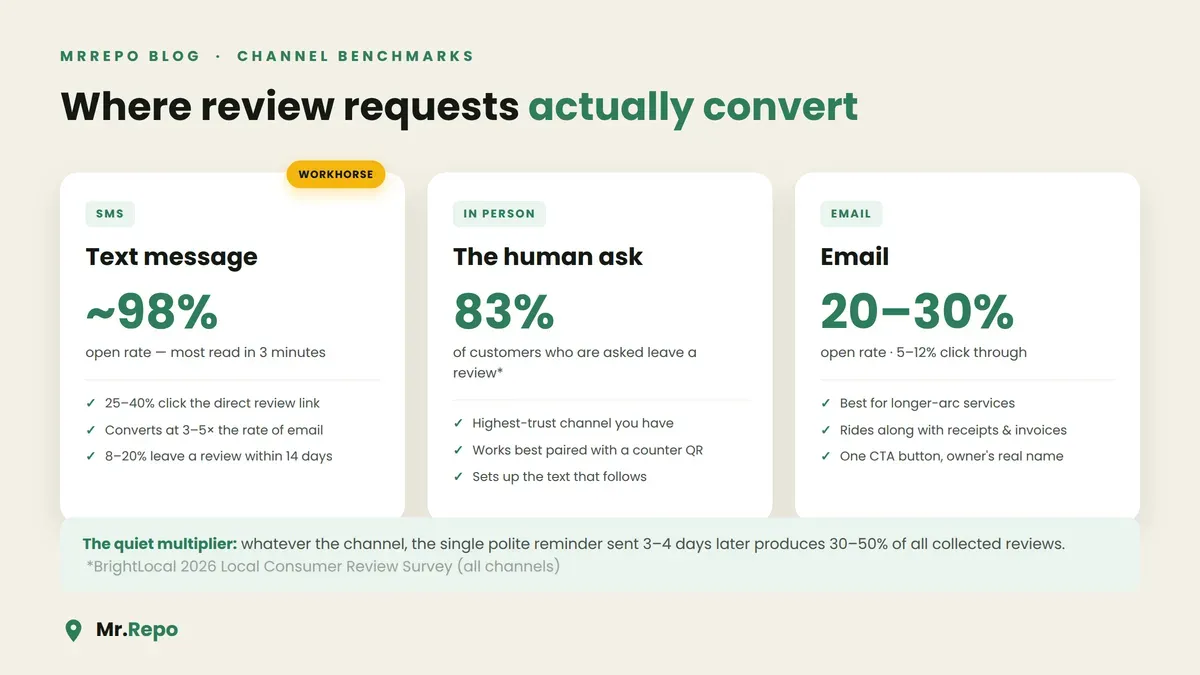
Text messages are opened about 98% of the time, most within three minutes. Email review requests get opened 20–30% of the time.
Direct review links sent by SMS get clicked at roughly 25–40%, versus 5–12% for email — in practice SMS converts at 3–5x the rate of email for review requests.
A healthy SMS review campaign converts 8–20% of customers into a published Google review within two weeks.
And the stat almost everyone misses: 30–50% of the reviews you'll collect come from the second message — the polite reminder — not the first ask.
So the playbook is simple: ask everyone, ask fast, ask on the right channel, and always follow up once.
The rules: what Google and the FTC allow (read this first)
Asking for reviews is completely fine. Google explicitly permits it. What gets businesses penalized is how they ask. Two lines you cannot cross:
1. No review gating. You may not pre-screen customers and steer only the happy ones to Google while diverting unhappy ones into a private form. Google bans "discouraging or prohibiting negative reviews and selectively soliciting positive reviews," and since October 21, 2024 the FTC's Rule on the Use of Consumer Reviews and Testimonials makes review suppression a federal matter, with civil penalties that can exceed $50,000 per violation. Ask every customer, the same way. (We've written a full breakdown of what review gating is and why Google bans it.)
2. No incentives. No discounts, freebies, gift cards, or contest entries in exchange for a Google review — even if you don't require it to be positive. "Leave us a review and get 10% off" violates Google's policy and can get reviews removed or your profile restricted.
Everything in the scripts below is compliant: a neutral, unconditional ask, sent to every customer, with an equal path to private feedback if they'd rather tell you directly. That's exactly the model MrRepo's QR flow is built on — every customer sees the same two options, no filtering, no bias.
How to ask in person (scripts by scenario)
The in-person ask is the highest-trust channel you have — a request from a human who just helped you lands differently than any message. The formula: specific moment + personal framing + effortless next step.
The service counter ask
"I'm really glad the color came out the way you wanted. If you have thirty seconds, a Google review honestly makes a huge difference for a small shop like ours — there's a QR code right here on the counter, it takes you straight there."
Why it works: it's anchored to a specific win ("the color came out"), it's honest about why it matters, and the QR code removes every step between intent and action. (Where you put that code matters more than you'd think — we tested this in where to put your feedback QR code so people actually scan it.)
The table visit (restaurants)
"So happy you enjoyed the lamb — it's our chef's favorite too. If you felt like sharing that in a Google review, the QR on the receipt takes about twenty seconds. It genuinely helps other people find us."
Never hover. Mention it once, point to the QR, walk away. For more restaurant-specific tactics, see how to get more Google reviews for your restaurant (without begging).
The checkout / follow-up call (clinics, trades, professional services)
"Before you go — we're a small practice and most new patients find us through Google. If you were happy with today's visit, a quick review would mean a lot. We'll text you a direct link so you don't have to search for us."
This one deliberately hands off to SMS, which is where the conversion actually happens.
Training staff without making it robotic
Give your team the formula, not a fixed script: name the specific thing that went well, say why reviews matter to the business, point to the QR or promise a text. One sentence each. Staff who understand the why ("reviews are how we compete with the chain across the street") sound human; staff handed a laminated script sound like a survey robot.
SMS review request templates
SMS is your workhorse: 98% open rates and 3–5x the conversion of email. Keep it under 320 characters, one link, no images.
Template 1 — same-day service (send 1–2 hours after):
Hi {Name}, it's {YourName} from {Business}. Thanks for coming in today! If you have 30 seconds, we'd love a quick Google review — it helps us more than you'd think: {link} Prefer to tell us privately? Same link works for that too.
Template 2 — visible-result service (send 24–48 hours after):
Hi {Name}, {Business} here — hope you're loving the {result: new floors / fresh cut / detailed car}! If you have a moment, a Google review would mean the world to our small team: {link}
Template 3 — the reminder (send 3–4 days after the first, only if no review yet):
Hi {Name}, just a gentle nudge from {Business} — if you meant to leave us that review and life got in the way (it happens!), here's the link again: {link}. Either way, thanks for choosing us.
That third message is not optional. Remember: 30–50% of total collected reviews come from the reminder. One reminder, ever — two or more reads as spam and starts costing you goodwill.
Compliance notes for SMS: get consent to text customers at intake (a checkbox at booking is enough in most regions), identify your business in every message, and honor opt-outs immediately.
Email review request templates
Email converts worse but still earns its keep for longer-arc services, older demographics, and businesses that already email receipts or invoices.
Subject line: How did we do, {Name}? (30 seconds, honestly)
Hi {Name},
Thanks for trusting {Business} with {the project / your visit / your order}. We're a small team, and Google reviews are genuinely how new customers decide to give us a chance.
If you were happy with everything, would you share a sentence or two?
[Leave a Google review →]
And if anything wasn't right, reply to this email or use the same link to reach us privately — the owner reads every message.
Thank you either way, {OwnerName}, {Business}
Rules of thumb: one CTA button, owner's real name at the bottom, no discount offers anywhere near the ask, and always the equal-weight private feedback path — both because it's the compliant way to ask and because private complaints you catch early are reviews you never have to publicly recover from.
Timing: when to ask, by business type
The right moment is when the experience is complete and emotionally peak — which lands differently by industry:
| Business type | When to send the ask |
|---|---|
| Restaurants, cafés, auto repair | 1–2 hours after the visit |
| Salons, detailing, body shops | 24–48 hours after (let them enjoy the result) |
| Contractors, remodeling, healthcare | 5–7 days after completion |
| E-commerce / delivery | 2–3 days after delivery |
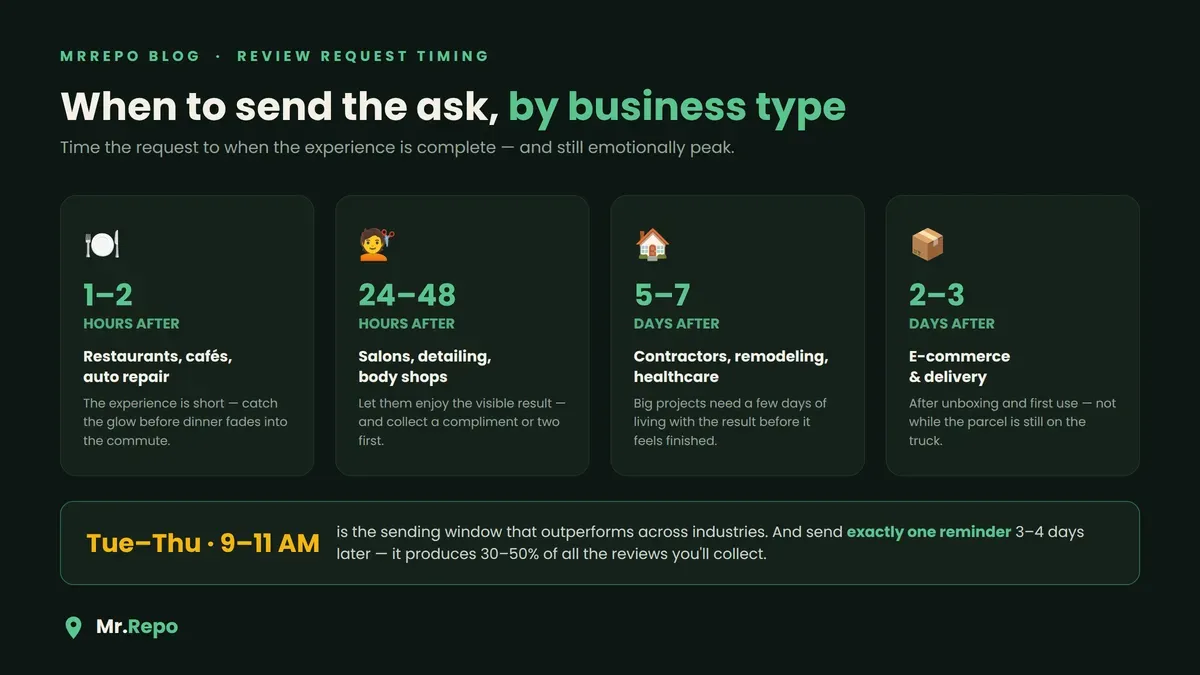
Across all of them, mid-week mornings — Tuesday to Thursday, roughly 9–11 am — outperform. Avoid before 9 am, after 8 pm, and Sunday/Monday-morning sends. And recency compounds: 44% of consumers in the 2026 BrightLocal survey say they only pay attention to reviews from the last month or so, which means a steady trickle of fresh reviews beats a one-time blitz every single time. (Fresh review velocity is also a Map Pack ranking signal.)
The mistakes that quietly kill review requests
Asking everyone at once. Blasting your whole customer list in one weekend produces a review spike that looks unnatural to Google's filters — and reviews that look unnatural have a way of disappearing. Ask continuously, as customers come through.
Sending a naked Google search link. "Just Google us and leave a review" loses 90% of people. Use the direct review link (from your Google Business Profile's "Ask for reviews" button) or a QR that opens it in one tap.
Asking before the experience is finished. A review request that arrives while the customer is still waiting on a fix reads as tone-deaf and invites a bad review.
Giving up after one ask. See above — the reminder is a third to a half of your volume.
Forgetting the loop. Collecting the review is half the job. 89% of consumers expect businesses to respond to reviews, and businesses that reply to at least 25% of their reviews average 35% more revenue than those that don't. Every ask you send should feed a system where you respond to the positive ones too.
Put it on autopilot (without losing the human touch)
Everything above works manually. But the businesses that win at this are the ones where the ask happens every time without anyone remembering to do it — the QR at the counter always there, the text always going out at the right hour, the reminder always following, every customer always seeing the same fair options.
That's what MrRepo automates: QR-code feedback collection where every customer gets an equal choice between a public Google review and private feedback, real-time alerts when something needs your attention, and analytics that show you which asks are actually converting. See how it works in the interactive demo.
FAQ
Is it against Google's rules to ask customers for reviews? No — asking is explicitly allowed. What's banned is selective asking (only approaching happy customers), discouraging negative reviews, and offering anything of value in exchange for a review.
Can I offer a discount for leaving a review? No. Incentivized Google reviews violate Google's policy regardless of whether you require the review to be positive, and disguised incentivized reviews can also create FTC exposure. Keep the ask unconditional.
How many times can I follow up? Once. The single reminder, sent 3–4 days after the first ask, produces 30–50% of total reviews. A second reminder crosses into nagging and damages the relationship you're trying to showcase.
What's the best channel if I can only pick one? SMS, and it's not close — ~98% open rates and 3–5x the conversion of email. But the in-person mention plus a QR code is the best setup for the text that follows.
Should I ask customers I suspect were unhappy? Yes — everyone gets the same ask. That's what keeps you compliant, and a fair flow gives unhappy customers an easy private path, which means you hear about the problem directly instead of reading about it on your profile.
What response rate should I expect? A well-timed SMS flow typically converts 8–20% of customers into a published review within two weeks. If you're below that, look at your timing window, whether your link is direct, and whether the reminder is actually going out.
Do review requests work for brand-new businesses with few reviews? They work best for new businesses — going from 3 reviews to 30 changes customer perception more than going from 300 to 330. Start asking from customer number one.
Key Takeaways
83% of customers asked to leave a review do it — and only 1–2% do it unprompted. The ask is the whole game.
Ask everyone, identically. Google bans review gating and selective solicitation; the FTC's 2024 rule adds federal penalties. An equal public/private choice keeps you safe.
SMS is the conversion channel (98% open rate, 3–5x email), the in-person mention is the trust channel, and email covers the long tail.
Time it to the experience: 1–2 hours for restaurants, 24–48 hours for visible results, 5–7 days for big projects — mid-week mornings win.
Send exactly one reminder. It will quietly produce a third to half of your reviews.
Never offer incentives, never blast your list in one go, and always respond to the reviews that come in.
